
Guides
The bug that printed confident nonsense
A school asked why the Arabic on its report cards was gibberish. It was not gibberish, and that is what made it hard to spot. What it takes to print Arabic properly in a PDF.
A school sent us a report card and asked why the Arabic subject names came out as nonsense.
They were not nonsense. They were confident, well-spaced, correctly-kerned Latin letters, printed neatly in the place where Arabic should have been. That distinction is the whole story, because it is what made the problem hard to see from our end. It did not look like a rendering failure. It looked like a school that had typed something wrong.
Why a PDF does this
The fonts built into the PDF standard are WinAnsi-encoded. They cover Latin and not much else.
Hand one of them Arabic and it does not draw a box, and it does not refuse. It takes each byte, maps it to whatever Latin glyph sits at that position in its own encoding, and draws that, at full quality. The output is a finished-looking document that nobody at the school can read.
A missing-glyph box would have been a better outcome. A row of boxes is obviously broken and gets reported on the first day. Plausible-looking Latin gets filed, and the school assumes the fault is theirs.
Three separate problems
Getting Arabic onto the page needs three things, and skipping any one of them still produces a wrong document rather than an obviously broken one.
A font that has the glyphs. Without an embedded face that actually contains Arabic, you are back to the Latin substitution above.
Shaping. Arabic letters change form depending on what sits either side of them: initial, medial, final, isolated. Draw the isolated forms in sequence and you get disconnected letters. A reader can decode it, in the way you can decode a word with the letters spaced out, and nobody would accept it on a document their child brings home.
Bidirectional ordering. The shaper does not do this, which is the part most often missed. A line that mixes Arabic with a pupil's Latin name or a numeric mark has to have its runs put in the right order first, and then the glyphs inside each run ordered by the shaper. Get it wrong and the mark ends up on the wrong side of the subject it belongs to.
So the order is: work out the run order, then let the shaper order what is inside each run.
Where we put the fix
At the single point where the platform creates a PDF document, not in each renderer.
A renderer that has to opt in to correct text is a renderer somebody eventually forgets, and the one they forget is the certificate. Patching the one place a document is created means every PDF that library draws got this at once: invoices, receipts, the family's own copies of both, the exam timetable and our own subscription receipt.
Four of our documents render through headless Chromium rather than the PDF library, and they needed
the other half of the same problem solved: an inlined Arabic face, and unicode-bidi: plaintext on
the elements that hold a school's own words. Those are the ones whose direction we cannot know in
advance, because they are whatever the school typed.
The bar for shipping it
A school with no Arabic gets byte-identical documents to the ones it got before.
That was the condition. A change to the text engine underneath every document the platform produces is exactly the sort of thing that shifts a margin by a point, re-wraps a line on someone's invoice, and turns into a fortnight of reports from schools who have nothing to do with Arabic.
If your school teaches Arabic
Nothing to switch on. Type Arabic into subject names, teacher remarks, class names or the head teacher's comment and it prints properly, mixed with Latin and with numbers on the same line.
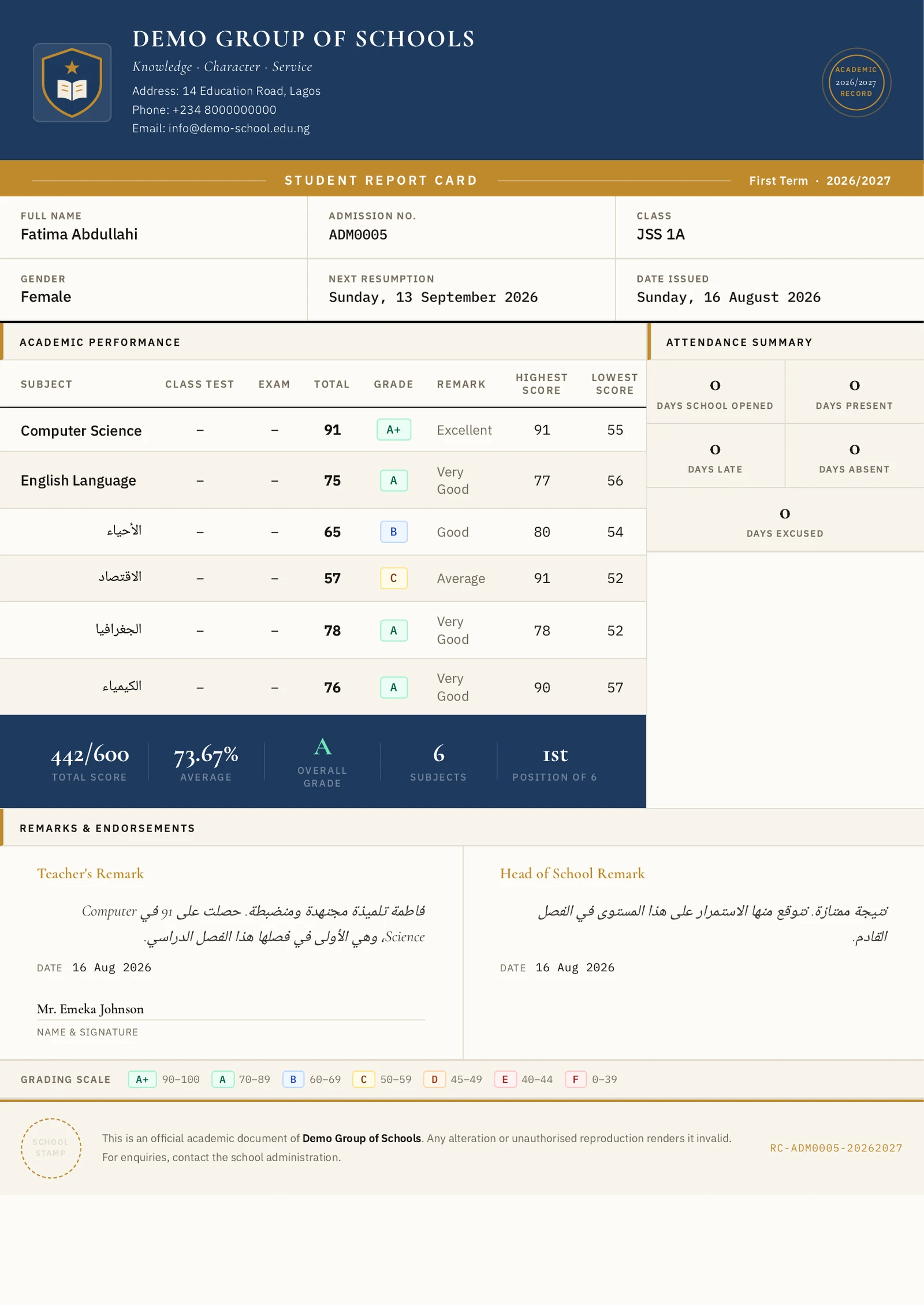
It pairs with the Hijri calendar option, which lets a school read and enter dates in the Umm al-Qura calendar, the Gregorian one, or both, without changing a single stored date. Both are the same idea: a school should be able to run in the language and the calendar it actually uses, and neither should require a separate version of the product.
Keep reading
Guides
Design the report card your school actually prints
Schools do not agree on what belongs on a report card, and until now ours only had one opinion. The Report Card Designer lets each school decide what appears, where it sits, and what it says.
Read article
Operations
Your school knows who was in class. Does it know who was teaching?
The pupils' register is taken every morning. Staff attendance is a signing book on the front desk. Here is how we built the second one, and the four things we deliberately refused to do.
Read article
Ready to try it with your school?
Three-month Basic trial. No card required to register.