
Academics
Attendance Documents to Print
Print a class's register with a signature column, an absence report naming the pupils whose attendance has slipped, and a month's timesheet for a member of staff.
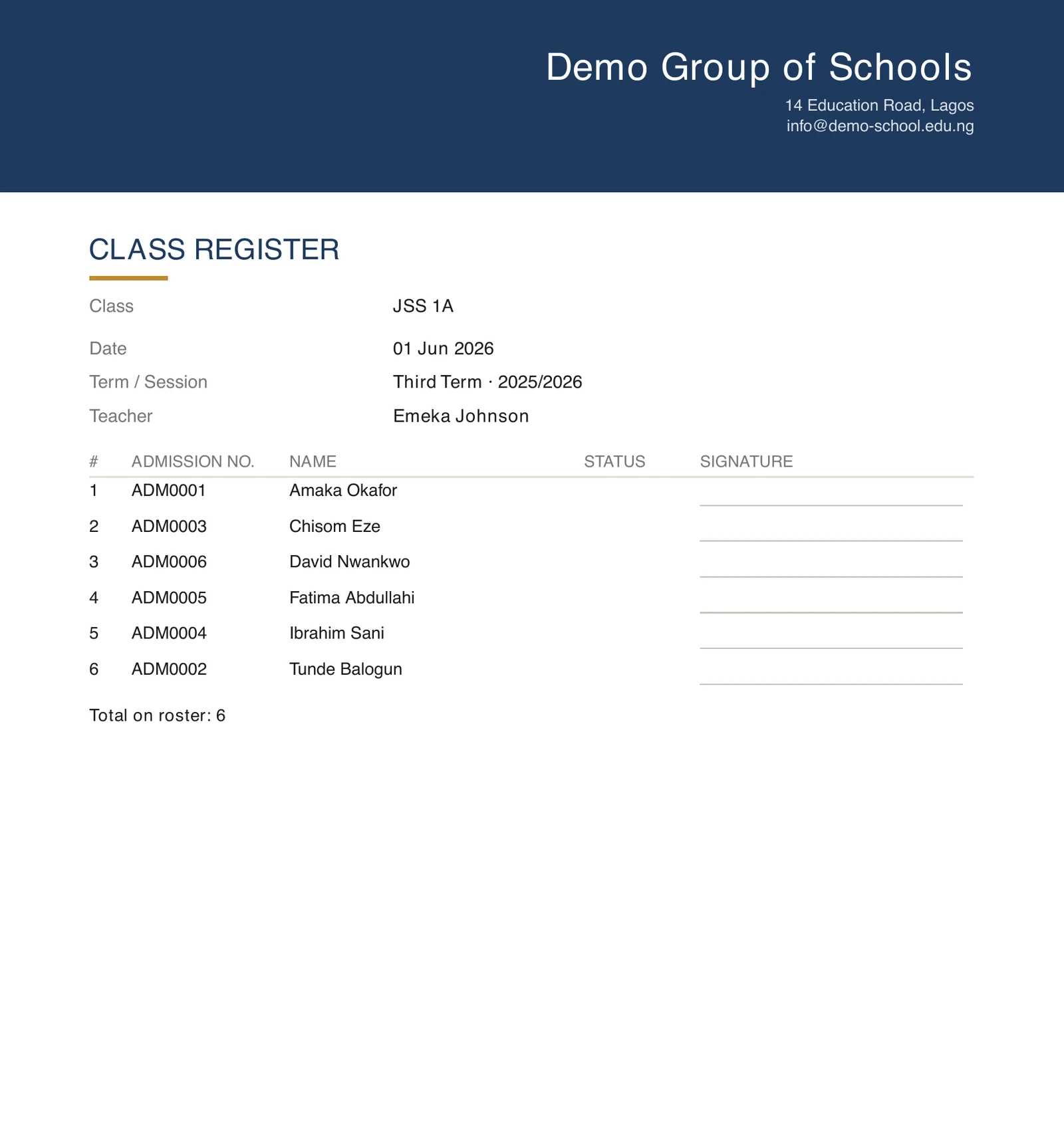
Three documents, each printed in your school's own colours with your logo and address at the top. All of them open on screen first, so you can check it is the right class and the right week before anything reaches a printer.
The class register sheet
Attendance → Register, choose the class and the date, then Register sheet.
It is the register on paper: every pupil on the roster, numbered, with their admission number, a column for the mark and a ruled signature column, which is the point of it. It is what a classroom uses when the phone stays in the bag, a supply teacher takes the class, or the day is one where a signature is wanted on paper.
The roster is read at the moment you print, so a pupil who joined last week is on it. If your calendar records the school as closed that day, the sheet says so rather than looking like an ordinary day nobody marked.
Anybody who may mark a register may print one. A class teacher does not have to ask an administrator for their own class's sheet.
The absence report
Attendance → Analytics → Absence report.
The pupils whose attendance over a window you choose sits at or below a rate you set, worst first, across one class or the whole school. It opens on the last twelve weeks at 75%, which you can change to whatever your school acts on.
It is the list somebody works from: who to ring, who to ask to a meeting, whose attendance to raise with a parent. The table on the Analytics page beside it answers the same question for the screen; this is the version that leaves the office.
Late arrivals count as attending, here as everywhere else on the platform, and an excused absence is still an absence from the classroom. Both are shown as their own columns so you can see which is which.
Because it names pupils across every class, it answers to the permission for seeing the whole school rather than to the one for taking a register.
The staff timesheet
Attendance → Staff on the web, then Timesheets at the top of the tab, and pick the person and the period. On the phone, open somebody's record from the board under More → Staff Attendance and their timesheet is a button on it.
One member of staff, days down the page, with arrival, departure, hours worked and anything flagged for checking, plus the totals at the foot. It is the sheet a bursar would otherwise assemble by hand, and anybody can print their own without a permission for it, the way reading your own payslip is not a privilege somebody grants you.
A day clocked in on a roll call rather than by the member of staff themselves says so in the Notes column, and the totals carry an Of which attested line under them. It is printed rather than folded into the hours because this is the document somebody is paid from: a figure that was attested by a colleague and one that was measured against a phone and a location are both honest, and a reader should be able to tell which they are looking at. The line is left off entirely for a school that has never taken a roll call.
A payroll export sits beside it: a spreadsheet, every stretch of time worked with the exact instants, covering one person or everybody, for feeding into a payroll system. It carries a column for each of those, so the same distinction survives into whatever you feed it to. That one is not offered for reading on screen, because a payroll feed is not a document anybody reads.
What is not printed
- A whole school's registers at once. A sheet is one class's day; a stack of forty is a job for the export, which already downloads whatever the register list is showing.
- The register sheet and the absence report, from a phone. Both are documents somebody prints, and whoever is printing one is at a desk. They are on the web only, deliberately.
The timesheet is the exception, because it is not only a thing to print. A member of staff can open their own on the app, under their attendance history, read it there and then save or share it. Reading your own record is the one case where the person wanting the document is holding a phone rather than sitting at a printer, which is also why it needs no permission. A colleague's is on the app too, from their record on the Staff Attendance board; the payroll export stays on the web.
On the phone
Only the staff timesheet is on the mobile app. The register sheet, the absence report and the payroll export are printed or downloaded from the web.
For your own timesheet, open More → My Attendance, tap See my last 30 days, then the My timesheet button at the top. For a colleague's, open More → Staff Attendance, tap their name on the Today board, then Timesheet. Either way the sheet opens on screen, and Save or share sends the PDF wherever you need it. The phone always shows the last 30 days; for another period, use Timesheets on the web.
Ready to try it with your school?
Three-month Basic trial. No card required to register.