
Academics
Printing a Timetable
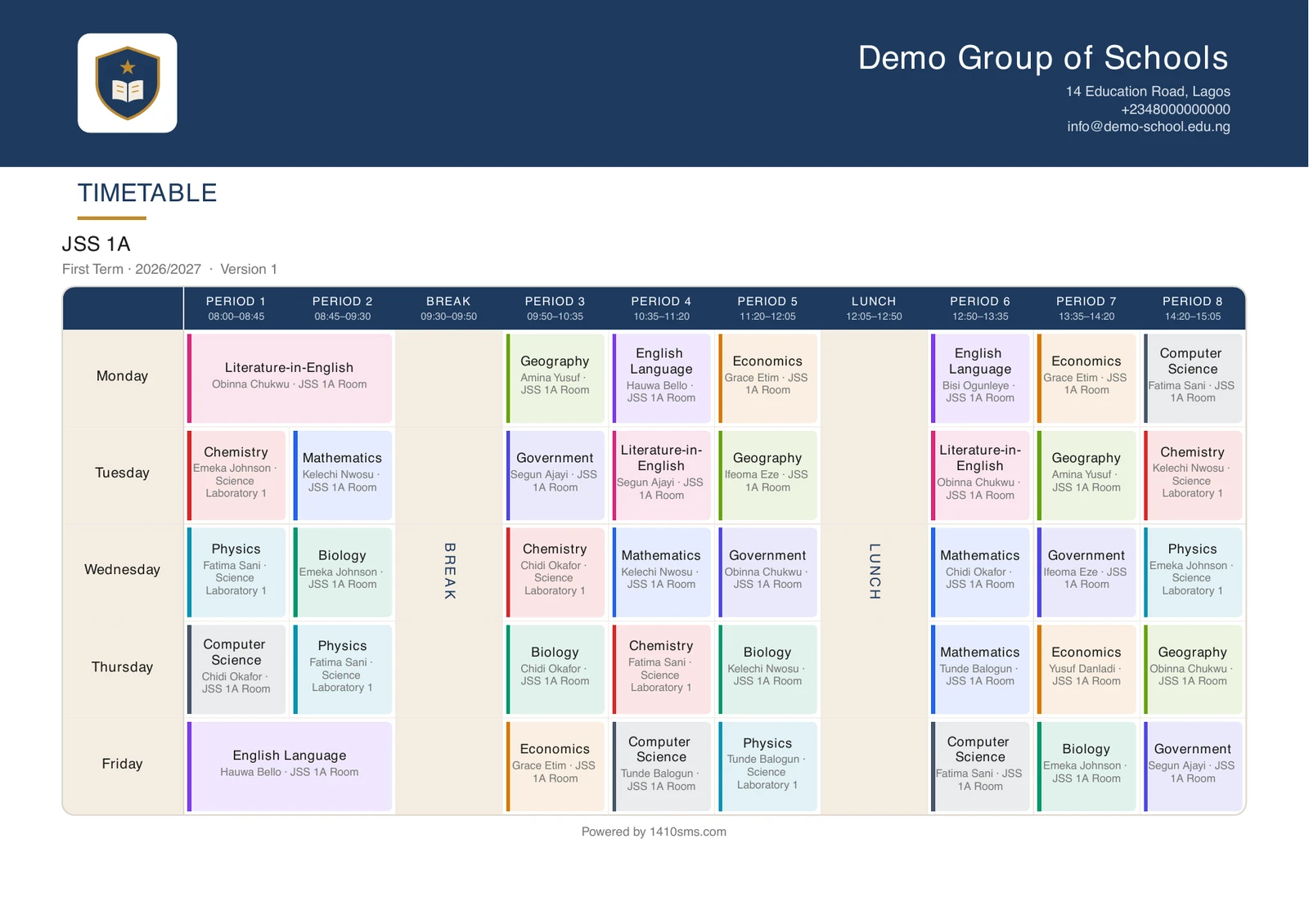
Download any class's or teacher's week as a branded landscape A4 sheet: the clock across the top, the days down the side, ready for a classroom wall or a staff pigeonhole.
A timetable on a screen is read by whoever is at the screen. A timetable on a wall is read by a class, all term, and by the teacher covering a lesson at ten minutes' notice. Print gives you the second one.
It is on two tabs of the Timetable workspace: Builder, which prints the class you are looking at, and Teachers, which prints the teacher you are looking at.
What comes out
One A4 sheet, landscape, in your school's own colours and carrying your logo and contact details. The periods run across the top with their bell times, the days run down the left, and every lesson is a card naming its subject, then who is taking it and where. It is the way a week is written on a whiteboard, and it is drawn to look like the screen it came from: the same rounded panel, the same coloured heading band, the same quiet rules, so the sheet in a pigeonhole and the week in the workspace read as one object rather than two.
The table is centred on the page rather than stretched across it, so a school running four periods a day gets four ordinary columns in the middle of the sheet rather than four enormous ones.
Breaks are drawn as a band down the whole column rather than as five empty cells, because a break is the same for every day and drawing it as the absence of a lesson makes the sheet look like it has holes in it. The break names itself down the band, in text turned on its side: a break column is the narrowest on the sheet, and a name set across it either shortens to nothing or forces the column wider than empty space deserves.
A double is drawn once, as one wide cell across the periods it runs through, rather than appearing twice or being cut in half by the line between two periods.
Each card is tinted in its subject's own colour, the one you give the subject on the Subjects page, so the same subject is the same colour everywhere in the week and a class can find Chemistry on the wall without reading a word. A subject you have not given a colour falls back to your school's own, which is what every lesson used to be, so a school that never opens that field loses nothing.
You can turn the colours off. Under Settings → Timetable, Colour each lesson by its subject draws the whole week in your school's own colour instead. It applies everywhere a week is drawn at once: the workspace, a class page, a pupil, a parent, and every PDF and printed copy. Worth doing if you print in black and white, or simply prefer a plainer sheet.
A free period is left blank. So is a period your bell schedule does not run on that day, which is what a school with a short Friday sees.
Whose week it is
A class sheet names the teacher against each lesson. It includes lessons taught to the whole year group at once: a class whose Maths is taken with the rest of its year in the hall has that lesson on its own timetable, because that is where the class has to be.
A teacher sheet names the class instead. It is drawn against every bell schedule that teacher works to, so somebody taking both a junior class and a senior one gets a single week rather than two half ones.
It never paginates
A school week is a fixed rectangle, and a timetable continued overleaf is one nobody can read without taking it off the wall. The rows shrink to fit the page instead.
On a long day the room is dropped from every lesson to make space, rather than from some of them: a sheet where two lessons name a room and thirty do not reads as missing data rather than as a choice. The subject and who it is with always stay.
Drafts print, and say so
You can print a draft. It carries a line under the title reading DRAFT: not the published timetable, in your school's accent colour.
That stamp is the point. A sheet pinned to a wall outlives the screen it was printed from, and a draft that looked exactly like the live week is the week a class ends up being taught by mistake.
The version number is on every sheet for the same reason: when the week changes and you reprint, the old sheet on the wall can be told apart from the new one at a glance.
On the phone
The mobile app prints the same sheet. Open a timetable and tap Week beside the day heading: the sheet is rendered and handed to your phone's own share sheet, which offers Save to Files, print, email and anything else you have installed.
Four people can do it, each getting their own week and nothing else:
- a student, their class's week;
- a parent, a child's week, named after the child rather than the class, because a parent with three children is choosing between people;
- a teacher, their own consolidated week across every class they take;
- an administrator, the week of whichever class they are looking at.
The sheet is always the school's live timetable, never a draft. Drafts are the workspace's business, and the phone has no builder.
And on the web
The same Download week (PDF) button sits on every timetable page in the browser: a student's own timetable, a parent's page for each child, a teacher's My Timetable, and the Timetable tab of any class. It prints the week on the screen, so nobody has to find the workspace to get a copy of their own timetable.
Who can print
Anyone who can see the timetable can print the published one, which now includes families on their own week. Printing a draft needs the same permission as seeing a draft on screen. A printed timetable is a copy that leaves the building, so it is not handed to somebody the workspace would not show it to.
Ready to try it with your school?
Three-month Basic trial. No card required to register.