
Academics
Written answers in online tests
Add theory questions to an online test. Candidates answer in their own words, the objective questions still mark themselves, and you mark the written answers by question or by script, in whole or half marks, with a comment for the candidate.
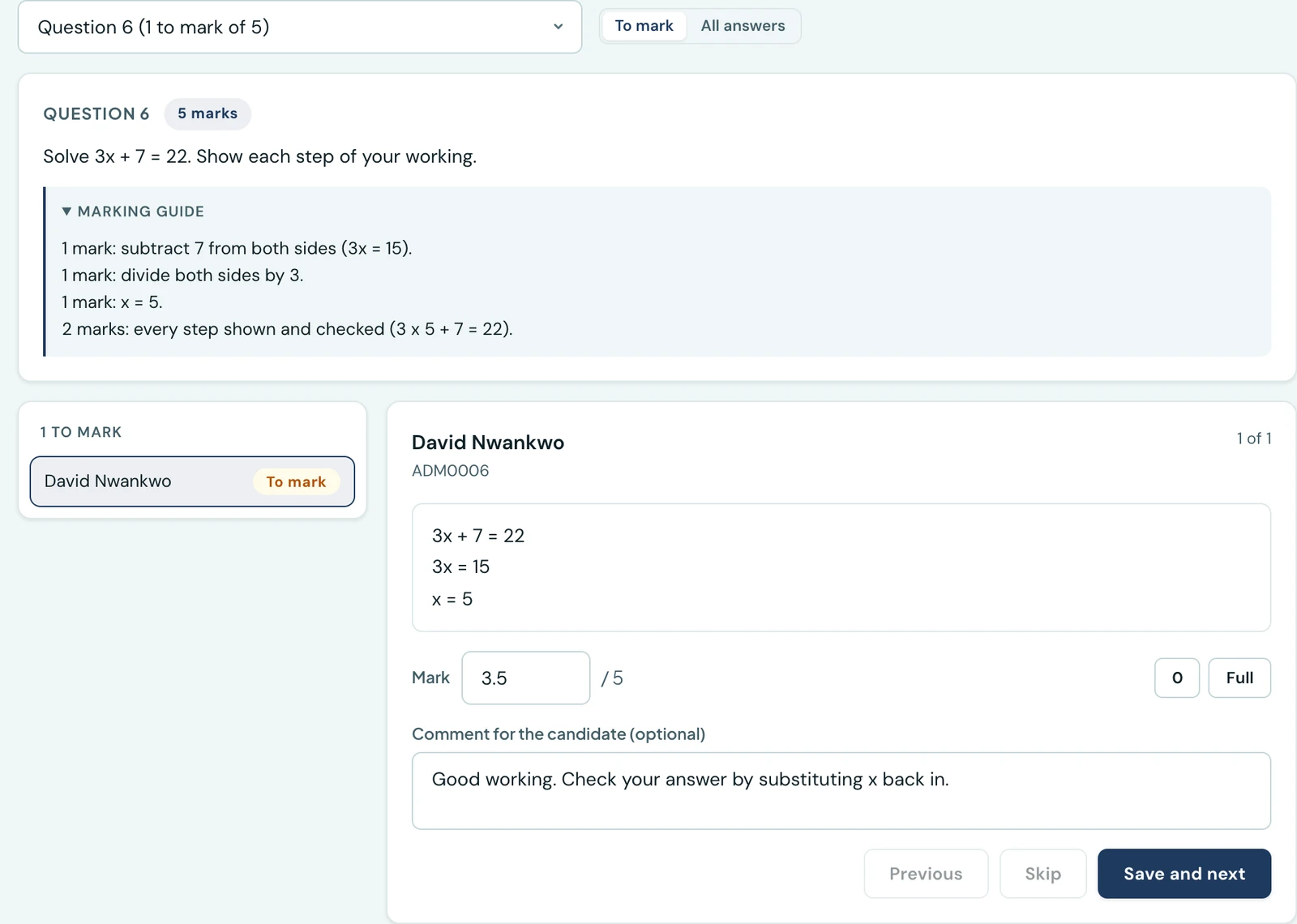
A test can mix questions that mark themselves with questions a teacher marks. Add a written answer question (a theory question) and candidates answer it in their own words. The multiple choice and true/false questions are marked the moment the paper is handed in, as before. The written answers wait for you, and you mark each one out of its marks, with a comment if you want to say why.
A mixed paper is one test: one set of results, one transcript per candidate, and, if it counts towards a term mark, one figure sent to one part.
Setting a written-answer question
On the test's questions page, choose Written answer as the type. Write the question as you would any other, give it its marks (usually more than 1), and add an image if it needs one.
There are no options and no correct answer. Instead there is an optional marking guide: what a full answer covers and how the marks are given. The guide is for markers only. Candidates and families never see it, and it is not printed on any transcript, including a staff copy, since a staff copy is often handed to a family. The explanation is still what candidates read once their result is released.
Question banks import from CSV or XLSX as before. A row whose type is theory leaves the options
and correctAnswer empty and may fill a markingGuide column. The template on the questions page
has an example row.
What candidates see while sitting it
A written-answer question shows a box to type in, with a count of the characters left. An answer can be up to 5,000 characters, roughly two handwritten pages. Answers are plain text, which is quickest to type on a phone.
A box left empty, or holding only spaces, counts as not answered, in the question count and in the warning before submitting.
The answers are kept on the device while the test is being sat, so a reload or a crashed browser does not lose an essay. Reopening the test brings them back, and the timer carries on from where it was. The kept answers are cleared when the paper is handed in and when the person signs out.
Marking
Open the test's results. When written answers are waiting, the page offers Mark N scripts, and each script still to mark carries an Awaiting marking badge. The marking page has two ways in, and both save the same marks.
- By question. Pick a question and work through every candidate's answer to it, one at a time, with the marking guide beside it. Save and next moves to the next answer. This is how examiners keep one question's marking consistent. When a question is done, the page offers the next one with answers to mark.
- By script. One candidate's whole paper: every written answer with its mark box, their objective score beside the written marks, and one Save. A row of the results list opens it directly with Mark (or Re-mark for a script already marked).
A mark is between 0 and what the question is worth, in whole or half marks (3.5 is fine; 3.25 is not). The comment is optional, up to 1,000 characters, and the candidate sees it with their result.
A candidate's score is recalculated from scratch each time a mark is saved: their objective marks plus every written mark so far. While any written answer on a script is still unmarked, the score on the results list is provisional. It shows in grey, without the pass or fail colour, and the transcript prints "Not yet marked" against each such answer and "Provisional" on the score.
What candidates and families see
Until the last written answer on a paper is marked, the candidate sees no score at all, even on a test set to show results straight away. The submitted screen says their written answers will be marked, and their result reads "Your teacher is marking this test." The parent portal leaves the test out of the child's list until then.
Once the paper is marked, and results are released for the test, the review shows each written answer with the candidate's own words, the marks given out of the marks available, your comment and the explanation. There is no correct or incorrect verdict on a written answer.
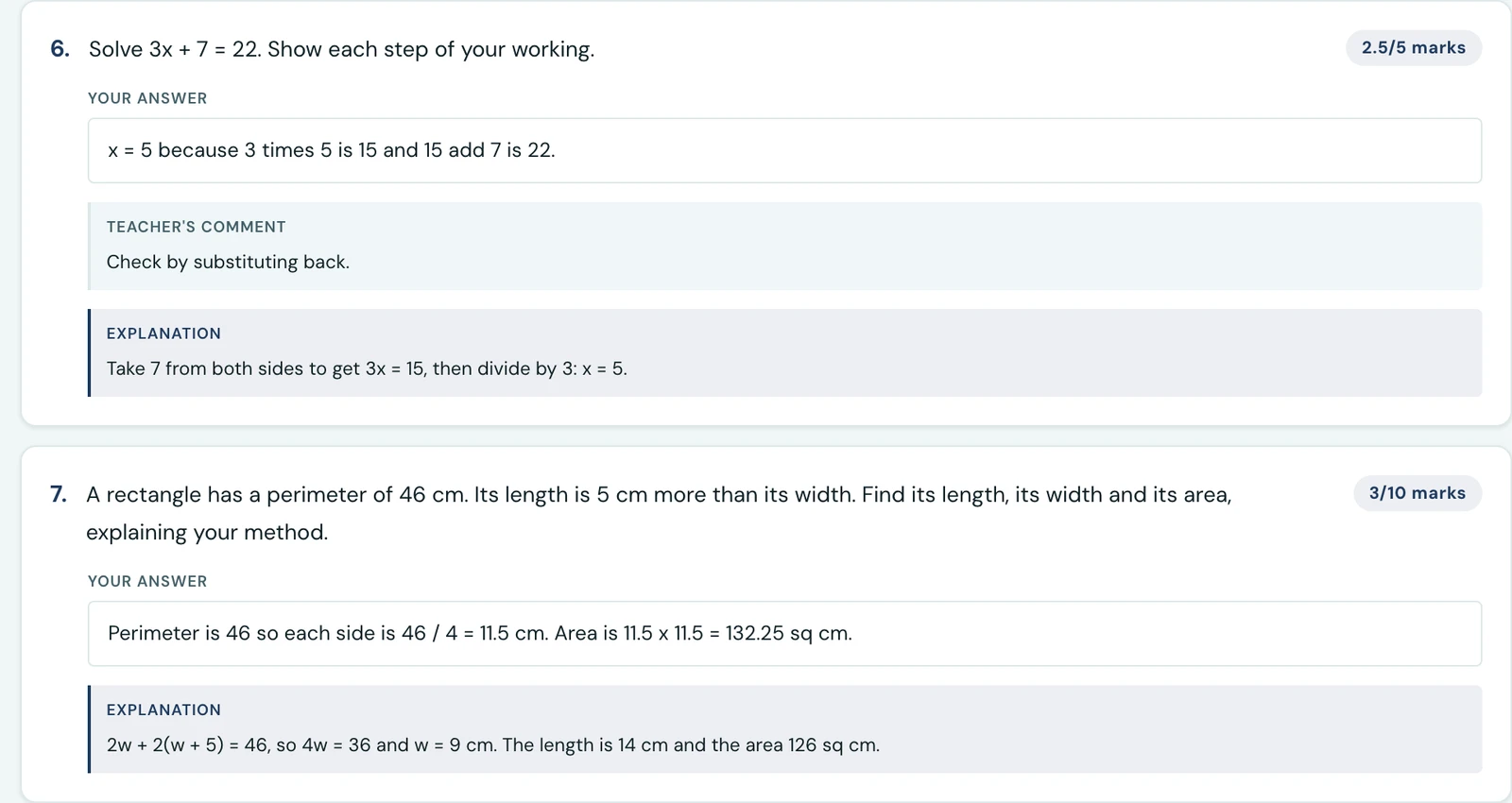
A marked written answer as the pupil sees it: their words, the marks, the teacher's comment and the explanation.
An entrance-exam candidate is emailed that their result is ready when the last of their written answers is marked, rather than when they submit. Pupils and families are not sent a new notification.
Re-marking
A mark can be changed, and the score follows it. Each save is recorded in the audit log, naming the candidate, the question and the mark before and after.
If the test counts towards a term mark, a script still being marked is not sent: the send preview counts it as awaiting marking, and sending again once it is marked writes its score. A re-mark after sending changes the score the next send writes, as long as the test's figure is still the one in the grade.
Once a script's figure is on a released report card, its marks cannot be changed: the page says "This mark is on a released report card. Amend the result to change it." Make the change as an amendment instead. A comment can still be corrected, since it changes nothing on the card.
Who can mark
Whoever can read the test's results: an administrator marks every test, and a teacher marks the tests they wrote. There is no separate permission.
A late paper, handed in after the time ran out, scores zero as before. Its written answers are kept for you to read but are not marked.
On the phone
Marking on the phone is coming with the same app update. Until then, mark on the web.
Ready to try it with your school?
Three-month Basic trial. No card required to register.