
Getting Started
Help Assistant
Ask how to do something in 1410SMS without leaving the page you are on. The Help button answers from the platform's own help pages, in steps, and opens the screen you need.
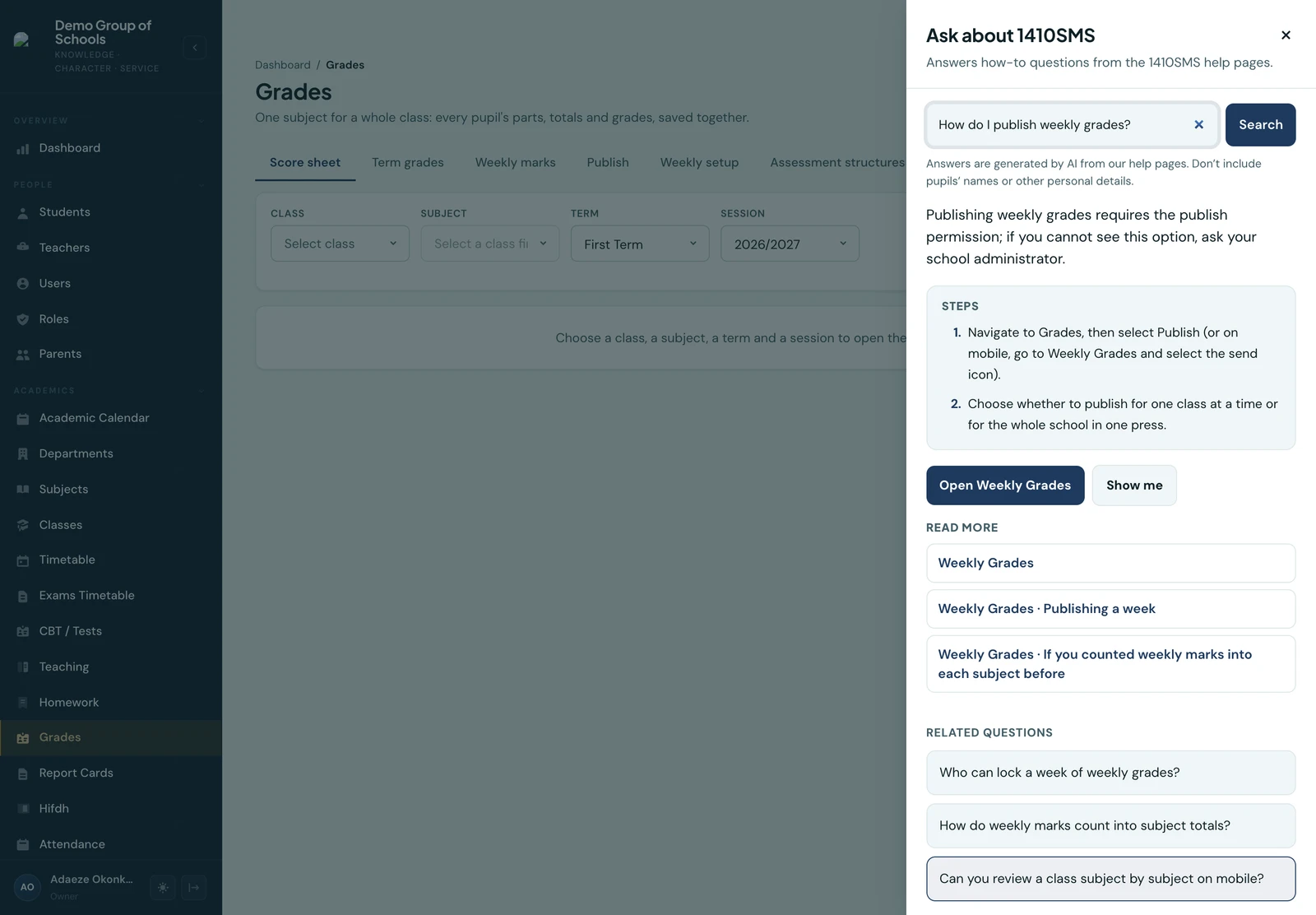
Every member of staff has a Help button in the bottom corner of every page, and a Help screen in the mobile app. Type a question the way you would ask a colleague, such as How do I publish weekly grades? or How do I record a part payment?, and the answer comes back as numbered steps drawn from these help pages.
What an answer gives you
- Steps, in the order you do them, with a line before them when the task needs a permission your role may not have
- Open the screen the steps happen on, where your role can open it. Where it cannot, the answer says so and suggests asking your school administrator
- Show me, on some answers, which points at each control on the page in turn
- Read more links to the help pages the answer came from, opened inside the panel or in full
- Related questions to ask next, and a follow-up keeps the last few questions in mind
If the help pages do not cover what you asked, the assistant says so rather than guessing, lists the pages that came closest, and offers a link to 1410SMS support.
Searching without asking
The same box searches the help pages as you type. Pick a result to read that section in the panel, with the web and mobile app instructions beside each other where they differ.
The list that appears while you type is the matching pages, not an answer. The assistant answers only when you press Enter or Ask (the send button on the phone), since each answer counts towards your daily allowance and a half-typed question would spend one.
On the phone
Help is in the mobile app too, under More → Support → Help, for staff only. It works the same way: type to search the help pages, or ask and get numbered steps, with Open taking you to the screen the steps happen on where your role can open it.
Answers in the app are written for the app. Where a help page says how its task is done on the phone, the answer gives those steps rather than the web's; where the page says the feature is not in the app, the answer says it is done in the web portal and gives the web steps. A section opened from an answer shows the page's phone instructions before the web's.
An answer stays on the Help screen while you follow it, so you can open the screen it points to and come back to the steps.
What the assistant sends, and what it keeps
Answers are written by an AI model (Google's Gemini) from the 1410SMS help pages alone. Before your question leaves the platform, email addresses, phone numbers, amounts, admission and invoice numbers and names that follow words like student or my son are removed, but please do not type pupils' names or other personal details in at all.
Nothing about your school's own records is sent: not your pupils, not your figures. The question, the help pages it is answered from and the name of the page you asked from are all the model sees. A question the help pages could not answer is kept for six months, with those details removed, together with the name of the page you asked it from, so that the pages can be improved; answered questions are not kept.
Who it is for
The assistant is for school staff. Parents and pupils have their own help pages on this site, and their portals do not show the Help button.
Each member of staff can ask up to 30 questions a day, and a school up to 500. Past either, the panel still searches the help pages; it just stops writing answers until the next day.
Ready to try it with your school?
Three-month Basic trial. No card required to register.