
Finance
Fee Quotes
An estimate for a parent whose children are not enrolled yet. Download it or email it, branded as your school, without creating a pupil record or an invoice.
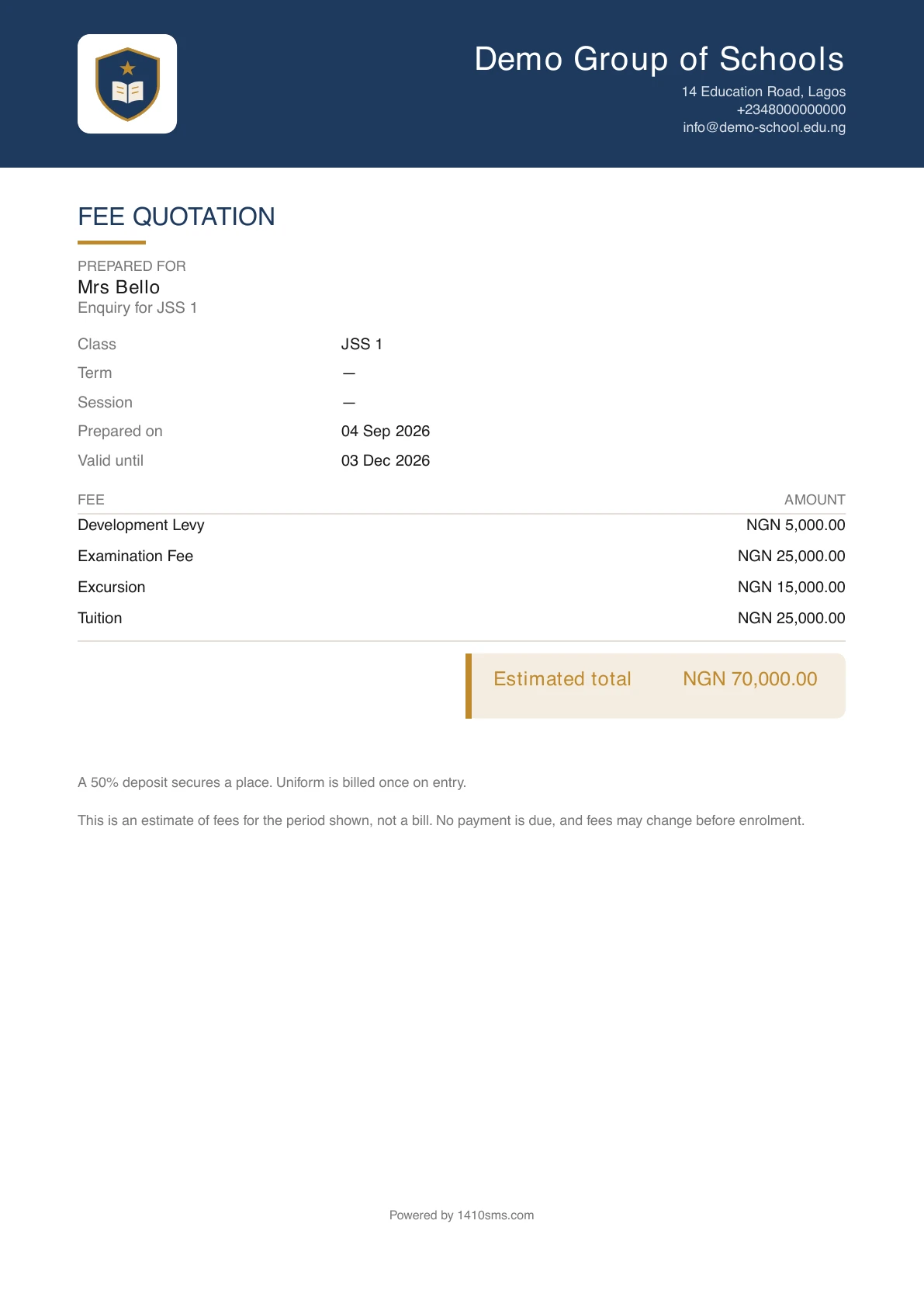
Someone rings the school and asks what a term costs. Their children are not enrolled, have no admission number, and may never come. You want to send them something on your letterhead.
Every other money document on the platform needs a pupil or a parent to hang off. A fee quote does not, which is the whole reason it exists.
What it is
Pick the fees, name who is asking, and either download the document or email it to them. It is branded as your school, exactly as an invoice or receipt is.
Nothing is saved. There is no quote to find later, no number, and no record anywhere that it happened. That is deliberate. A quote nobody owes cannot be counted as revenue, cannot turn up in your arrears, and cannot need cancelling or reconciling. The alternative, before this existed, was to create a pupil record for a child who may never enrol, which puts them in your roster count, your class lists and your attendance registers for the sake of a slip of paper.
Producing one
Go to Fees → Fee structures → Quote fees. On the phone it is in the Fees overflow menu.
| Field | What it does |
|---|---|
| Prepared for | The enquirer's name, printed on the document. Optional, because most people just ask what your fees are. |
| Class | The year group they are asking about, printed as your school words it. |
| Session and Term | Printed on the document, so a quote is anchored to a period. |
| Currency | Your school's default, changeable per quote. |
| Start from a template | Your existing fee templates, so the figure you quote is the figure the invoice would carry. |
| Fees quoted | The lines themselves, edited exactly as on an invoice. |
| Note | Anything you want under the figures: a deposit rule, a deadline. |
| Email it to | Where to send it. Leave it blank and download instead. |
Then Download PDF, or Send by email to have it arrive with the PDF attached.
It cannot be mistaken for a bill
That is the one way a document like this can do harm, so several things guard against it:
- it is titled FEE QUOTATION, not Invoice;
- it says Prepared for, where an invoice says Billed to;
- the figure is an Estimated total, not a balance;
- it carries no bank details, because a document that can be paid against is one somebody will pay against;
- and it prints a line saying it is an estimate rather than a bill, that no payment is due, and that fees may change before enrolment. That line prints whether or not you added a note of your own.
It also carries a Valid until date, three months out. Fee structures change every session, and a quote with no expiry is one a family produces in eighteen months when yours has changed twice.
Who can produce one
Anyone who can either manage fee structures or create invoices. A quote only discloses fees you have already set, so whoever raises the term's invoices can answer an enquiry without being trusted to redesign what the school charges.
When they enrol
There is nothing to convert, because there was nothing stored. Enrol the child as you normally would and raise a real invoice. If you started from a template, picking the same one gives you the same figures.
On the phone
Quotes can be produced on the mobile app. Open Fees, tap the ⋮ menu and choose Quote fees. The form has the same fields as on the web: Prepared for, Class, Session, Term, Currency, Start from a template, the fee lines and a Note, with the Estimated total updating as you go.
Tap Download PDF to keep the document on the phone, or fill in Email it to and tap Send by email. As on the web, nothing is saved.
Ready to try it with your school?
Three-month Basic trial. No card required to register.