
Academics
Online Exam Papers
Sit a paper on the CBT module and it stays a paper on the exam timetable: one date, one time, one class list, kept in step automatically.
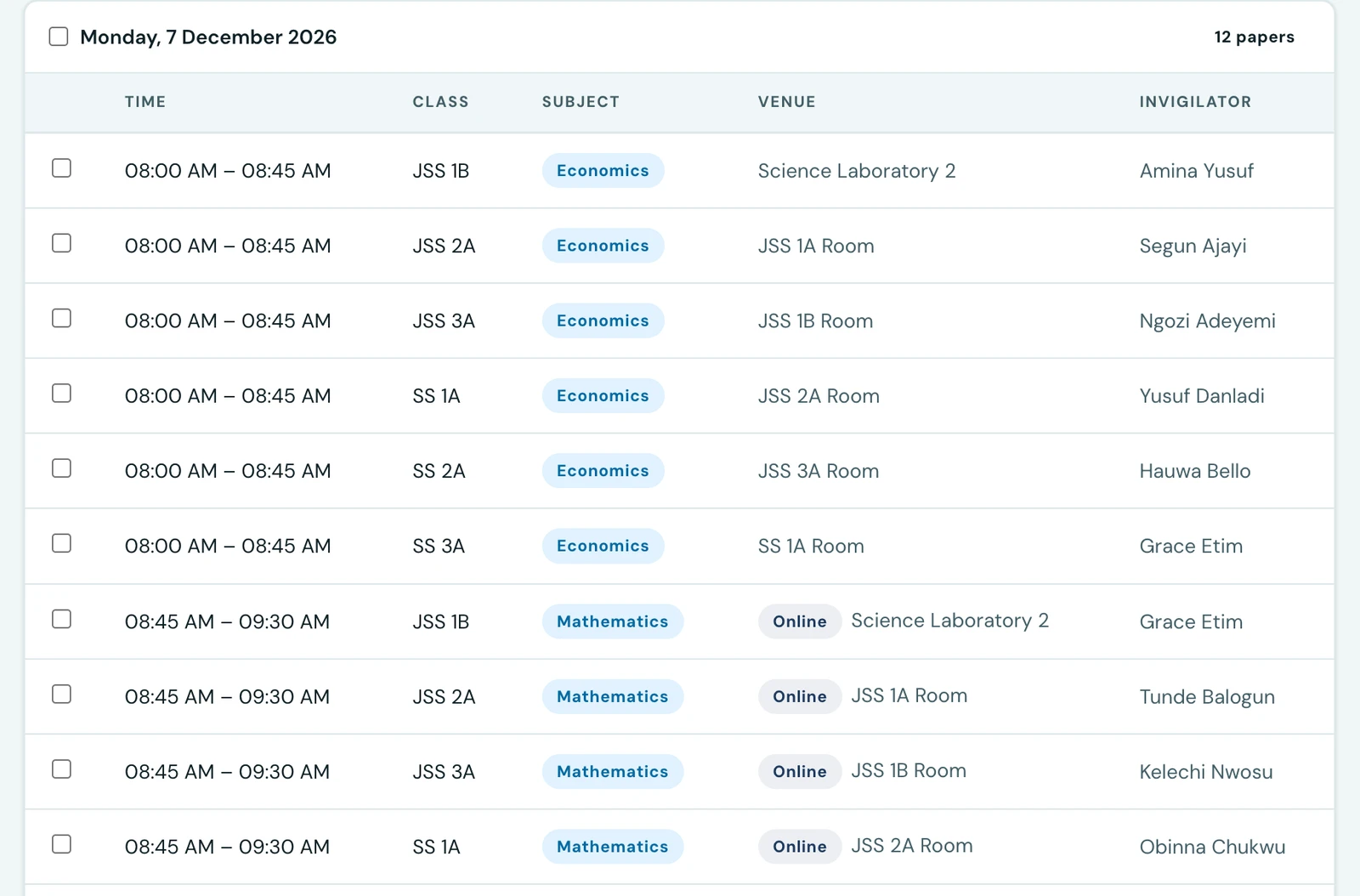
A school running an exam paper online used to describe it twice. Once on the exam timetable, as a paper with a date, a time and a venue. Once in the CBT module, as a test with its own start time, its own end time and its own class list, typed again.
Nothing joined the two. So a paper that moved left its test behind, opening on a morning the timetable no longer mentioned; a class added to the exam was not added to the test; and the printed timetable sent the candidates to a hall for a paper they were meant to sit at a screen.
Now a paper can name the test that is its paper, and from that moment the paper decides everything the two used to disagree about.
Linking a paper to a test
On the Builder tab of the exams workspace, tick the paper (or papers) in the list, then use the Online paper control at the bottom of the selection bar. Pick the test and press Set as online paper.
The picker offers the school's own CBT tests, with each one's question count and how long it allows. It leaves out anything that could not be linked: an entrance-exam test, which is sat by candidates who are on no class list, and a test already serving another exam.
One paper, several classes
A year group sitting one online paper is one test and one row per class, exactly as an ordinary paper is. Tick all of those rows and link them in one go.
They must be the same subject at the same date and time. If they are not, the control says so before you press anything: a single test cannot be open from one class's Tuesday to another's Thursday without being open to both throughout. Move them together first, and the move bar directly above is how.
What the paper then decides
When the test opens and closes. The window becomes the paper's date and times, and it follows the paper: move the paper by a day, and the test moves with it. The candidate's own countdown is unchanged, still the shorter of the time the test allows and the time left in the window.
Which classes may sit it. The test's class list becomes the classes sitting the linked papers. Add a class to the paper and it can sit the test; drop one and it cannot.
While a paper is linked, those fields are read-only in the CBT module, which says which paper they come from. Everything else about the test, its title, its questions, its marks, stays editable there as before.
Nothing is moved under a candidate mid-paper. Once anybody has started, the paper cannot be moved, unlinked or removed until the attempts are done.
What it looks like to everybody else
- The exam timetable shows an Online tag where the venue goes, on the staff list, on the student portal, on a parent's page for their child, and on the phone. Where a room is booked as well, it prints beside the tag: somebody still has to be in it.
- The four printed sheets (a class's papers, an invigilator's list, a room's day, the
attendance sheet) print
Onlinein the venue column for the same reason. - Publishing the exam publishes the linked tests. A test still in draft is one no candidate can open, and that failure would surface on the morning, to the whole cohort at once. Unpublishing the exam afterwards does not close them again: candidates may already have sat.
What the checks say before you publish
The pre-publish check gains four findings for online papers. Two of them refuse a publish:
- The linked test has no questions. The candidates sit down, open it and find nothing.
- The test allows longer than the paper runs. The platform enforces whichever is shorter, so a test allowing 120 minutes in a 90-minute paper tells the candidate they have time they do not have.
Two are worth a look and do not stop anything:
- The paper has nowhere named to sit it, so the timetable does not say where to go.
- The test shows its score the moment it is submitted, which is unusual for an exam paper: results are normally released together, and a candidate walking out knowing their mark has told the next cohort something about the paper.
Who can do it
Linking needs both Manage exams and Manage CBT, since it reaches into a test and changes when it opens. A school whose exams officer does not run the CBT module keeps the two jobs separate, and the control is simply not shown to them.
Holding both is still not the run of everybody's tests. A teacher may only link a test they built themselves, and the picker offers them only those. It is the same rule that decides which tests they can edit under Tests. An administrator may link any of the school's.
Deleting an exam that has an online paper
Deleting an exam series destroys its papers, online ones included, and the confirmation says how many of them were sat online.
It does not touch the test. The questions, the candidates who sat it and their answers are all on the test, which stays where it was under Tests. Deleting the series only stops it being a paper on a timetable.
What this does not do
A mark from an online paper is not written into the grade book. The results are on the test as they always were: the Online tag on the paper is a link to them, for anyone who can open the CBT module at all. Recording a CBT mark as a term grade is a separate decision the platform has not taken.
The phone shows online papers and never links them: linking is done from the web's Builder tab, deliberately.
On the phone
On the mobile app, open More → Exams and a series. A paper sat online carries an Online tag before its venue, and the room still prints beside it where one is booked. Removing such a paper, or deleting the series, says so in the confirmation, and says the test itself stays.
Linking a paper to a test is done on the web, from the Builder tab; the phone shows online papers but has no control to link or unlink one.
Ready to try it with your school?
Three-month Basic trial. No card required to register.