
Academics
Staff Leave and Absence Reporting
Record that a member of staff is away for a range of days, under the kinds of leave your school recognises, and get one message each morning naming everybody who was absent the day before.
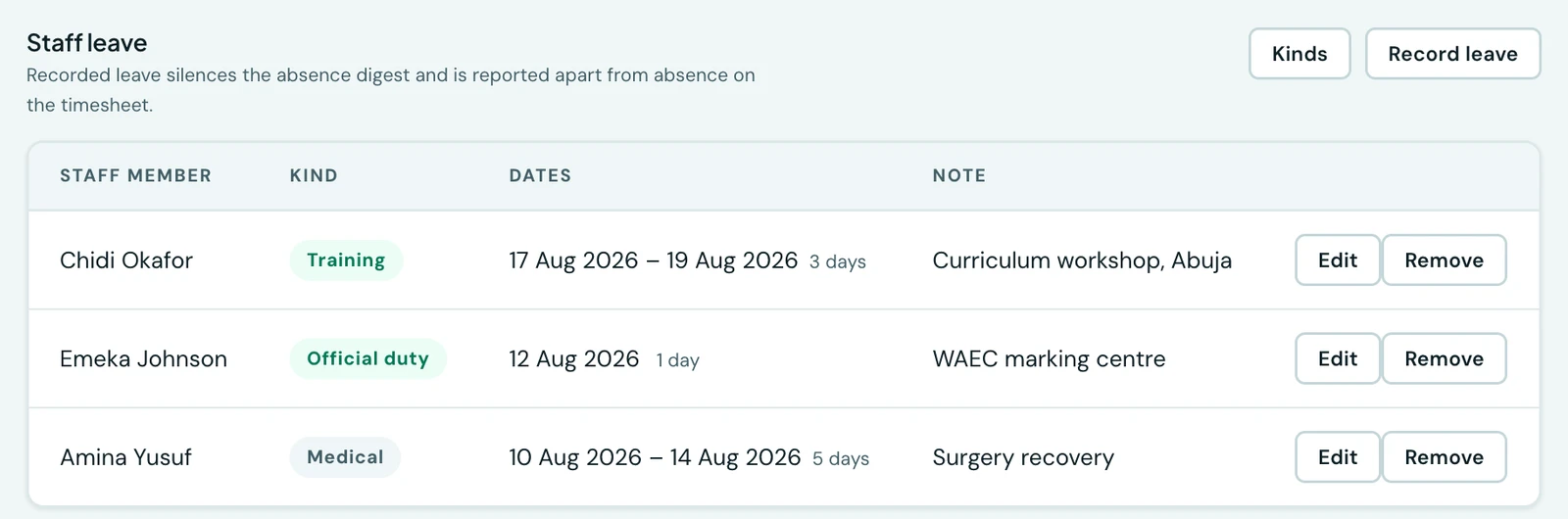
Somebody at a training course all week is not absent, and a platform that calls them absent every morning is one your office stops reading. Recording leave is what tells the difference.
Recording leave
Attendance → Staff on the web, in the Staff leave panel below the day's board, or More → Staff Attendance → Leave in the mobile app, where it is a tab of its own. Choose the person, the kind, and the first and last day. Both ends are included, so a single day off is a range with the same date twice.
Leave is granted in days, not hours. Half a day off is not something this records: it would put a second idea of a working day beside the one your Academic Calendar already keeps, and the two would disagree the first time anybody looked.
There is no request-and-approve queue, and that is deliberate. An administrator records that somebody is away, the same way they record anything else here. Who asked, who agreed and how much entitlement is left is an HR process, and it belongs to the workforce module rather than being half-built inside attendance.
The kinds of leave your school recognises
Four are there from the start: Official duty, Training, Medical and Compassionate. You can rename them, add your own, and disable the ones you do not use.
The setting that matters on each is counts as a working day. Official duty at an examination centre, or a day at a training course, is not an absence, and the two duty-like kinds are seeded that way, so those days stay out of every absence figure. Medical and Compassionate are seeded as absences and are reported as such. Every one of those is a starting point rather than a rule: a school that disagrees changes it.
A kind is disabled rather than deleted. It stays on the records that already name it and stops being offered on new ones, because deleting it would rewrite what your school recorded about a day that has already happened. The catalogue is edited from the same two places the register is: the Leave panel on the web, and the Leave tab in the mobile app.
One record, read by everything
The day board, the timesheets, the morning absence message and the clock-in reminder all read the same leave record. That is the point of it being one record: nothing can call somebody absent on a day something else has them on official duty.
The morning absence message
Each morning at your school's own seven o'clock, whoever runs the school gets one message naming everybody who was absent the day before. One message, not one per person: eleven notifications on a bad Monday tell you nothing the first did not.
Somebody is absent when the day was a working day on your calendar, they had no leave recorded, and they never clocked in. Nothing is written down: it is worked out fresh every time it is asked for, which is why a correction or a leave entry added next week fixes the record everywhere rather than leaving a stale row behind saying otherwise.
Who receives it is decided by permission, not by job title, so it reaches the people you have granted staff attendance oversight and nobody else.
The clock-in reminder
Anybody who has not clocked in by the time you set is sent a reminder on their phone. At most two, and never:
- on a day your calendar says the school is closed,
- while they have leave recorded,
- once they have clocked in, however they did it, or
- if they have no approved phone to clock in from, since there would be nothing to act on.
A reminder that has not reached the phone within ten minutes is dropped rather than delivered late, and so is one still waiting to go out when a punch is recorded. If a reminder did arrive first, the app removes it from the phone's notifications the next time its Clock in screen is opened.
It is worded as a question (are you at school?) because it is a clock, not a tracker. The app never reads anybody's location in the background, so the platform genuinely does not know where anybody is, and it does not word anything as though it did.
Turn it off, or move the time, under Settings → Attendance, which is also where the morning absence message is switched on and off.
What is not here
- Cover. The platform records that somebody is away; it does not yet reassign their lessons.
- Entitlement and balances. How many days of each kind somebody has left is workforce management, and is on the roadmap as its own module.
- Requests from staff. See above: leave is recorded by an administrator.
On the phone
Leave is recorded on the mobile app as fully as on the web. Open More → Staff Attendance and the Leave tab. Record leave asks for the member of staff, the kind and the first and last day, and tapping an entry lets you correct or delete it. The Kinds of leave button opens the catalogue, where you add a kind, rename one, set whether it Counts as a working day, and switch off Offered on new records to disable it.
The morning absence message needs nothing from you: on the phone it arrives in Notifications, the bell on the dashboard, rather than as a push. The clock-in reminder does arrive as a push, on the phone of whoever has not clocked in. Both are switched on and off, and the reminder time set, under More → Settings → Attendance.
Ready to try it with your school?
Three-month Basic trial. No card required to register.