
Advanced
Staff Without an Email Address
A member of staff signs in with their email address or their phone number, whichever your school holds. Staff with no inbox get an account and a password you hand them, and staff with neither can still be rostered and paid.
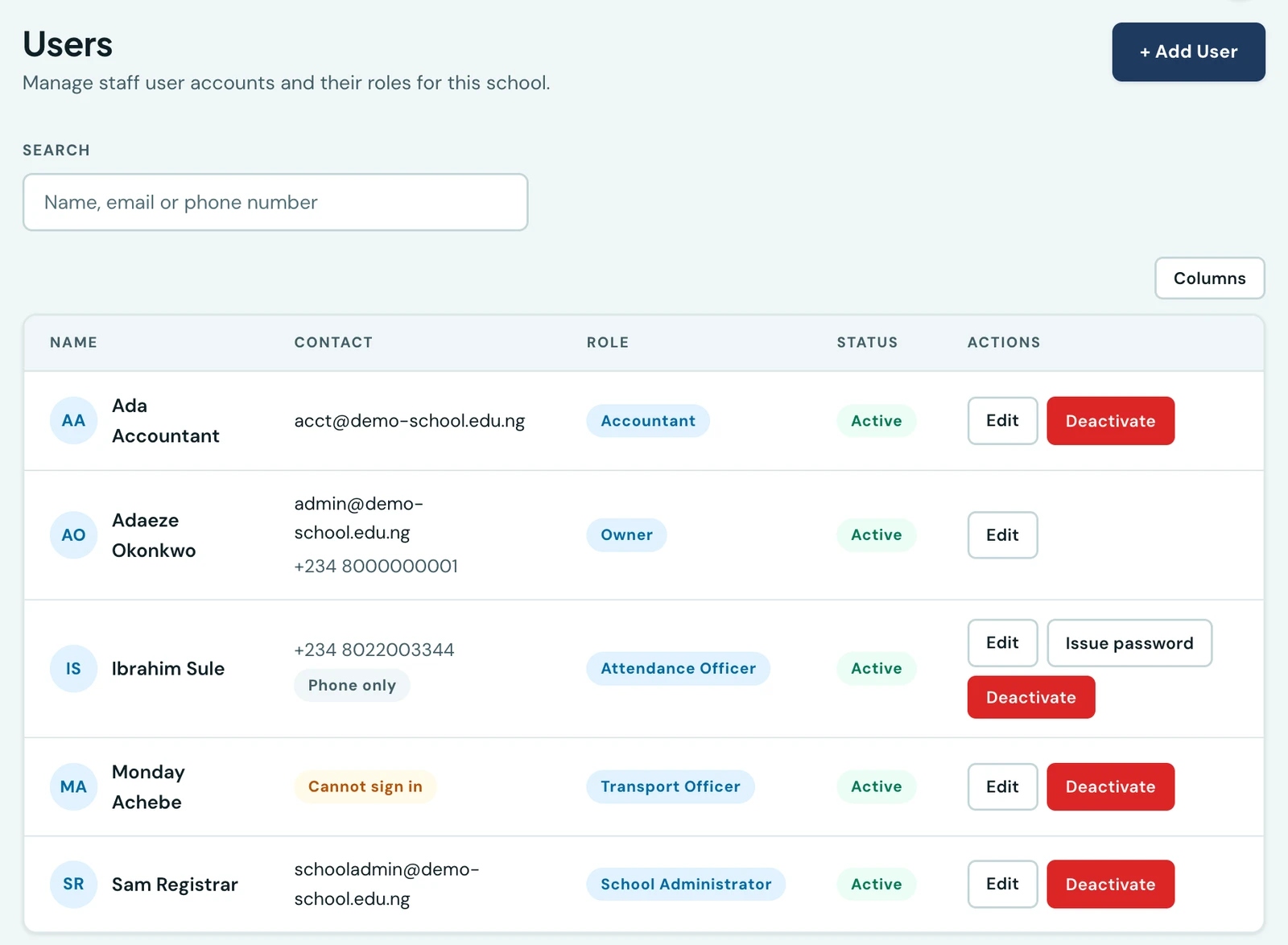
Not everybody who works at a school has an email address.
Signing in
The staff sign-in page has one box, labelled Email or phone number. Type whichever the school holds for you; the platform works out which it is.
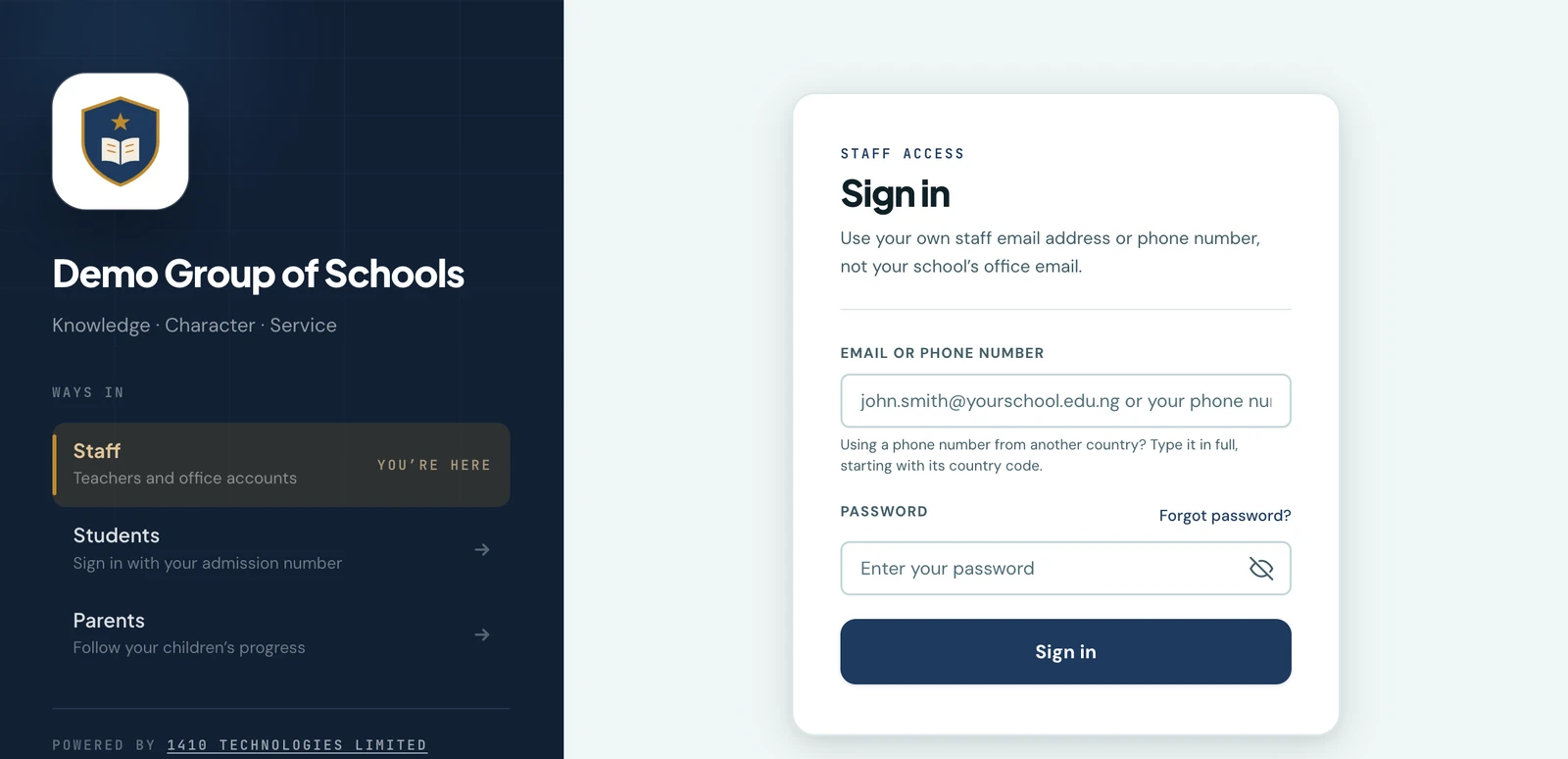
One field, not two. Which of the two it is, and whether it is well formed, is the platform's problem rather than the reader's.
A number can be typed the way it is written locally, 08022003344, or in full, +2348022003344.
Both reach the same account, so nobody has to remember which form their school typed in.
A number from another country is typed in full, starting with its own country code. A locally written number carries no country in it, so the platform reads it against your school's dialling code, which is right for almost everybody and wrong for the Ghanaian teacher at a Nigerian school. The hint under the box says so. There is no country dropdown on the sign-in page on purpose: asking somebody to answer a question about their own number before they can get through the door is a worse trade than one line of guidance.
Everywhere other than that one box, the country is picked from a list rather than guessed, so a number is stored exactly as the school entered it.
Adding a member of staff who has no email address
Users → Add User, and leave the email field empty. As you fill the contact fields in, a line underneath tells you which kind of account you are creating:
- An address, with or without a number. An invitation is emailed and they choose their own password, exactly as before. Nothing here changed for staff who have an inbox.
- A number and no address. There is nowhere to send an invitation, so the platform generates a password and shows it to you once, on the screen you are already on. You hand it over. The web offers a printed handover slip, and both the web and the app offer a copy button.
- Neither. Allowed, and the account cannot sign in. See below.
The password is shown once and is not recoverable. It is warned about before it is shown rather than after, and it is never stored anywhere it could be read back, which is the whole reason it is safe to generate one. Write it down or print the slip before you close the dialog.
There is no forced password change. Encourage the person to change it from their own profile; the platform does not insist, because a first-login wall is a poor experience for somebody being handed a password at a gate.
If they forget it
Somebody with an email address resets their own password with a code, and no administrator is involved. Somebody with only a phone number cannot, so the Users page offers Issue password on their row, which generates a new one and shows it to you once, exactly as creating the account did.
This is a serious action and the platform treats it as one. It ends every session that account has open, it is recorded in your audit log (without recording what was issued), and it is refused for any account that has an email address, since those have a reset flow of their own that reaches the person rather than passing through whoever is holding this screen. The button is therefore only ever offered on a row that has no other way back in, which is why it appears on one row of the list above and not the others.
Because whoever presses it can then sign in as that person, it needs the Manage users permission, which is the Owner's rather than every administrator's.
Staff with neither an email address nor a phone number
This is allowed, and the list marks it plainly: Cannot sign in.
Such an account exists to be rostered, clocked in on a roll call, included in the timesheet and paid. It is a record of somebody who works at your school, not a login. Nothing about the platform refuses to create one, because a school should be able to record everybody it employs, and the note under the fields says what you are creating rather than the form arguing with you.
There is no loophole in it: an empty sign-in box is refused before any account is looked for, so an account with nothing to sign in with is unmatchable rather than matched by an empty identifier.
What changes for notifications
Nothing except email. A member of staff with no address does not receive the emails they never had anywhere to receive. Everything else works: they appear on rosters and registers, they are clocked in and out, they collect a timesheet, and they are on the payroll export like everybody else.
Finding them again
The Users list searches the phone number as well as the name and the address, and it matches
however the number was typed. Searching 0801, +234 801 or 234801 all find the same person.
The Contact column answers the question the office actually has, which is can this person sign in, and can we reach them: one contact per row, a Phone only badge where there is no address, and Cannot sign in where there is neither.
On the phone
All of it is in the mobile app under More → Users, on the same permission as the web: the same optional email field, and the same one-shot password, shown in a sheet with the same warning and the same copy button. The printed handover slip is the one part that is web-only.
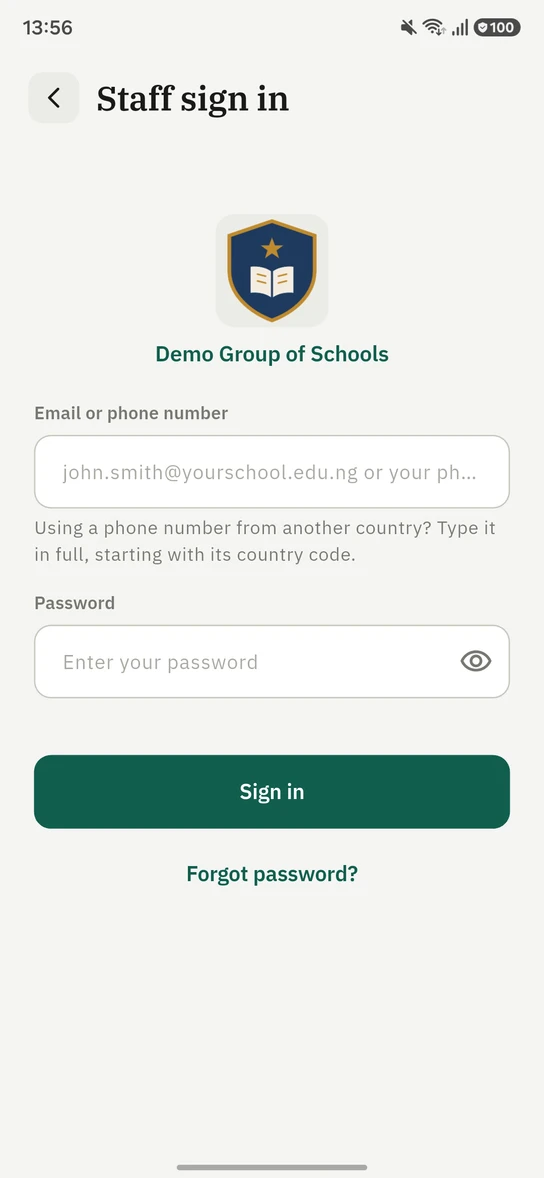
The app asks the same one question the browser does, so somebody handed a number and a password has the same thing to type wherever they are given the app.
Teachers
A teacher's record still requires an email address. Teachers are managed on their own Teachers page rather than here, and the change described on this page has not reached them yet.
Ready to try it with your school?
Three-month Basic trial. No card required to register.