
Finance
Staff advances
Money released to a member of staff, and how he accounts for it. See at any moment how much of the school's cash is sitting in staff pockets unexplained.
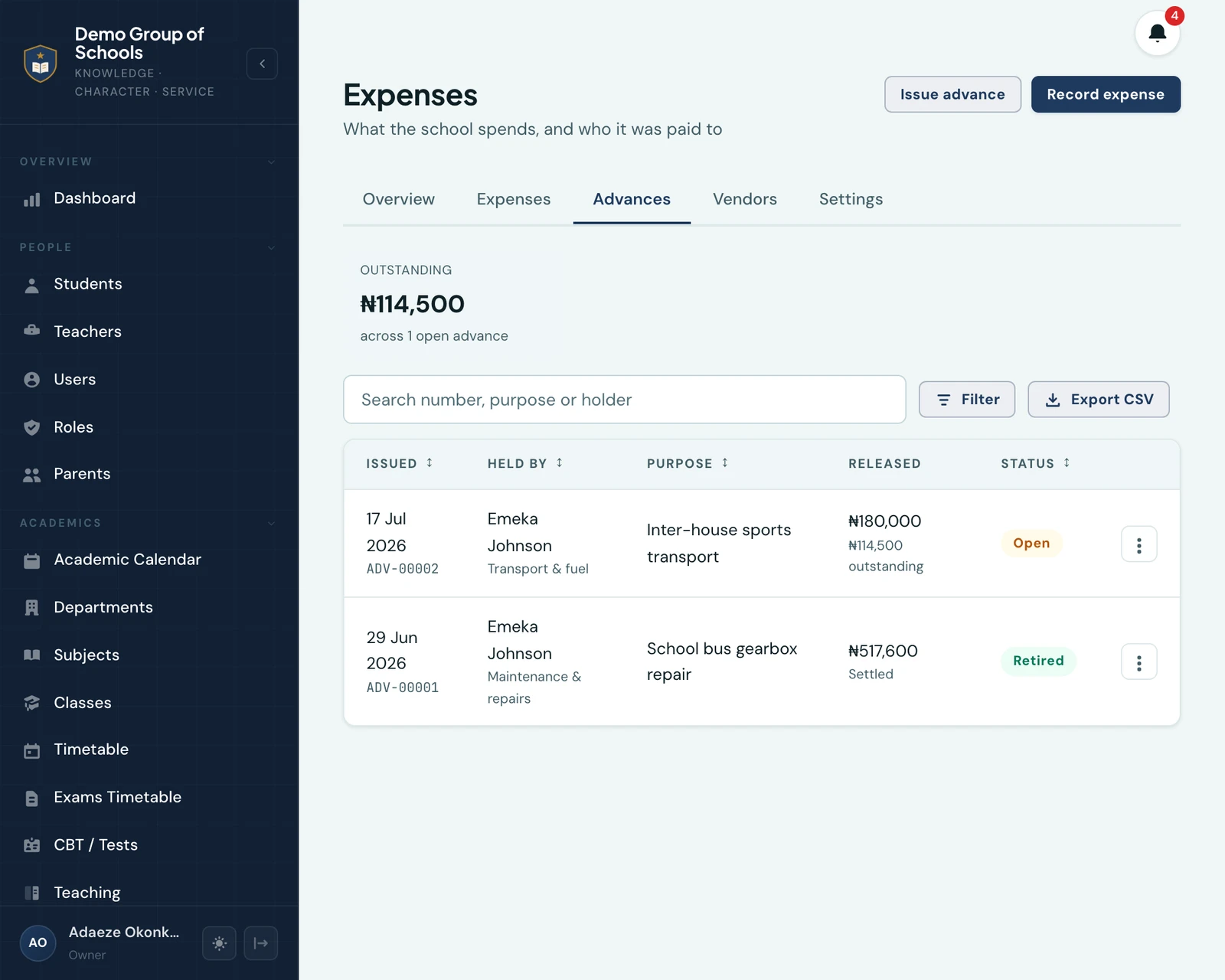
A school gives its maintenance officer ₦500,000 to fix the school bus. He goes to the market, spends it over a fortnight, and comes back with a handful of receipts. Staff advances is how he accounts for that money, and how you see, at any moment, how much of the school's cash is sitting in staff pockets unexplained.
The words are the ones a Nigerian school office already uses. You issue an advance, and the person holding it retires it.
It lives on the Advances tab of Finance → Expenses.
Issuing one
Issue advance asks for six things:
- Who holds it: the member of staff the money is going to. He does not need any finance permission, and should not have one.
- What it is for, in your own words. This is the line everybody reads later.
- How much, and in which currency.
- The category it will be filed under when it is retired. You pick it now, while the school still knows what it handed the money over for.
- How the money moved: cash, transfer, POS, cheque and the rest, with which of your accounts it left and the transfer reference.
- The date it was released.
Each advance gets a number of its own, ADV-00001, in the same style as your invoice, receipt and
voucher numbers.
The holder is told, in the app and in his notification centre, the moment it is issued. That matters more than it sounds: he has probably never opened this part of the platform, and without it he is handed half a million naira and left to work out on his own that the school expects an account of it.
Accounting for it
The holder opens My Advances, taps the advance, and adds a line for each thing he bought: how much, what day, what it was for, and a photograph of the receipt.
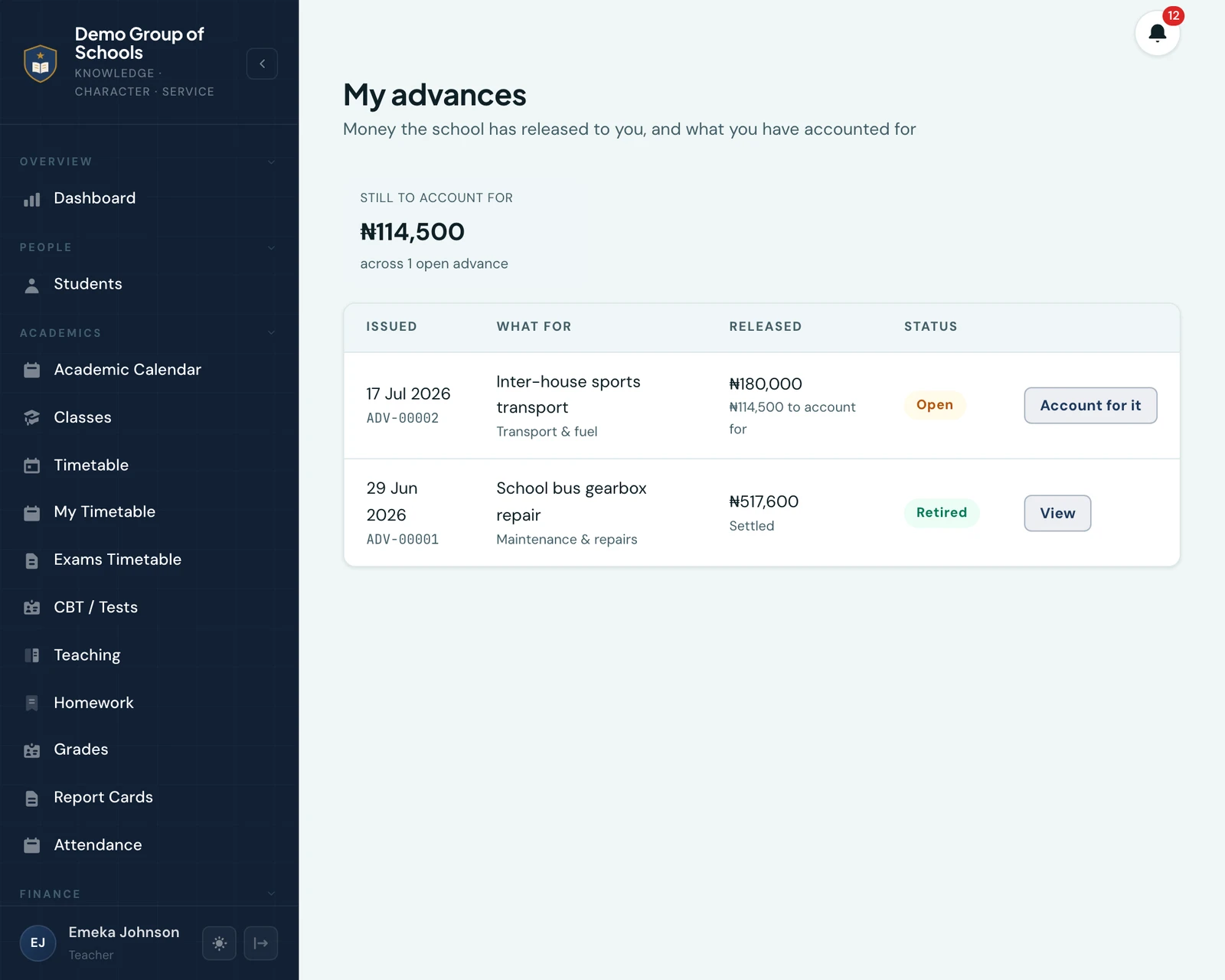
He reaches this by holding an advance, not by holding a permission. There is no key to grant and none to forget, which is the point: the man with the receipts is a driver, a maintenance officer or a teacher sent out for exercise books, and he must never be given the run of your spending record, which is where the payroll and the rent are.
When the lines add up to what he was given, Retire closes it.
When the figures do not meet
They usually do not, at first, and the platform is built around that rather than around the tidy case.
- He brought money back. He spends ₦480,000 of the ₦500,000 and hands you ₦20,000 in cash. You record that as money returned. The advance now says ₦480,000 was released, his lines meet it, and the school spent ₦480,000, which is the truth.
- He needed more mid-job. Record a further release. What is outstanding moves with it.
- He spent his own money. His lines come to ₦530,000 against the ₦500,000 he was given, and the advance reads Due to holder, ₦30,000. Pay him back and record it as a release, and the two sides meet.
Every one of those is a row on the advance's own ledger, so the advance always shows what went out, what came back and who recorded each. Nothing can be dated before the day the advance was issued, because money he had not yet been given is not money he had already spent.
You cannot retire an advance whose figures do not meet, and the screen tells you what the gap is while you work rather than refusing you at the end.
What it does to your spending figures
An outstanding advance is not an expense. It is money owed back to the school, so nothing at all reaches your expense record until the advance is retired, at which point one expense is written for the whole advance, under the category chosen when it was issued.
This is worth stating plainly because it will look wrong to somebody: money that physically left the bank in August may not appear in August's spending. That is correct. In August the school had not spent it, it had lent it. If every advance counted as spend the day it went out, and the receipts counted again when they came in, your spending would be overstated by the value of every advance the school had ever made.
The outstanding figure is shown beside your cash-flow statement rather than inside it, per currency, never added together.
The advance payment voucher
Every advance prints as a voucher: the number, who holds the money and what for, the category, the amount in figures and in words, the whole ledger of what went out and came back, whatever has been accounted for so far, and ruled lines for prepared by, authorised by and received by.
Three figures print rather than one, because an advance is a receivable and the fact is a pair and a difference: what was released, what has been accounted for, and what is left. The amount written out in words is what was released, since that is the sentence an office reads aloud when it hands the money over. Where the holder overspent, the third line reads Due to holder and prints an amount, rather than reading Outstanding and printing a negative.
A voided advance has no voucher, for the same reason a cancelled invoice has none.
Correcting one
A retired advance is reopened, which voids the expense it wrote, keeping its voucher number and its strike-through, and lets a fresh one be written once the lines are right. The expense an advance wrote cannot be edited or voided on its own: it belongs to the advance, and correcting it anywhere else would leave the advance claiming to be settled with nothing recording the spending.
An advance issued in error is voided, with a reason. That is not a write-off: an advance nobody ever balances is meant to go on sitting on the outstanding list, which is the thing you are reading this page to be able to see.
Who can see it
| Permission | What it allows |
|---|---|
| View advances | The tab, every advance in the school, the outstanding figure, the ledger and the CSV |
| Issue advances | Issue one, record money out or back, reopen a retired one, void one |
The Owner, the School Administrator and the Accountant hold both out of the box. Everybody else holds neither, and still reaches his own advances by holding one. A school cannot decline to let a man account for money it handed him, so that access is not something you have to switch on, and not something you can switch off.
On the phone
The holder's half is why this was built for the app first: the man with the receipts is standing at a mechanic's shed, not at a desk. More → My Advances is his, and his line form opens the camera first, so a receipt is photographed where he is rather than carried around in a pocket until it is lost.
The bursar's half is a third tab on the app's own Expenses screen: the same list, the same outstanding figure, and the same issuing, movements, reopening and voiding. A school that never opens the web client at all loses nothing.
Where advances stop
There is no approval step, and that is deliberate rather than missing. The holder went to the market already; recording what he bought is him explaining himself, not asking permission, and an approval queue assumes a second person to do the approving that most schools asking for this do not have.
There are no standing petty-cash floats either. A float is an advance with a standing purpose and an opening balance, and the opening balance is the part that is not built. If that is what your school keeps, say so and it can be looked at properly.
Ready to try it with your school?
Three-month Basic trial. No card required to register.