
Academics
Approving and Locking Results
Teachers submit each subject when its marks are finished, a head approves each class, and a term is released only once its classes are approved. After release the marks are locked, and a correction needs a reason that the family and the report card both see.
A report card goes home once, and families keep it. A mark that changes afterwards leaves a family holding a card the portal no longer agrees with, and nobody told them why. So results now move through three steps before families see them, and stay put once they have.
- A teacher submits each subject they teach in a class when its marks are finished.
- A head approves the class.
- The school releases the term, as it always has, from Publishing report cards.
Once a term is released its marks are locked. Correcting one is still possible, by somebody allowed to, with a reason, and the family is told.
Where a class stands
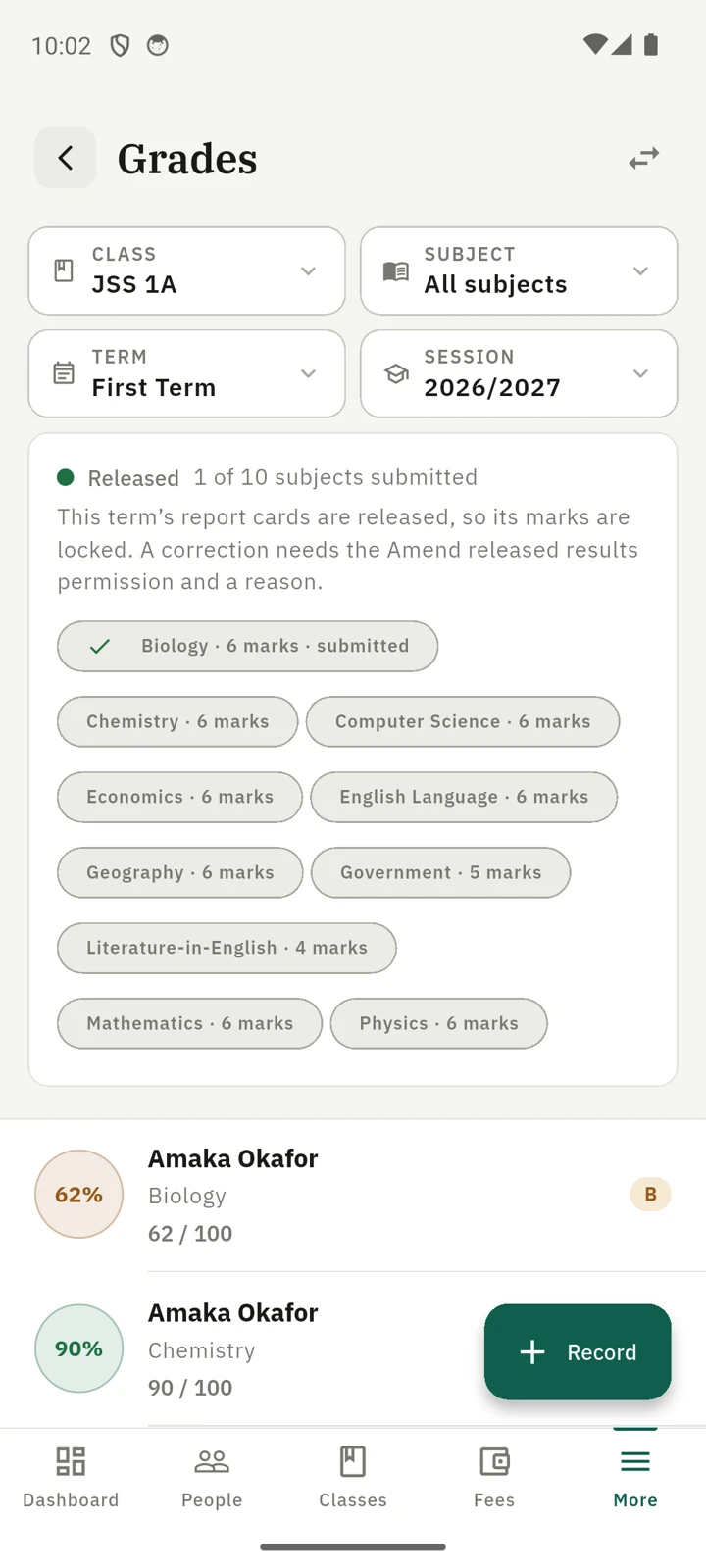
Choose a class, a term and a session on the Grades list, on the Broadsheet or on Add Grades, and a panel above the marks says where that class is:
- Not approved, Approved or Released, with who approved it and when.
- How many of its subjects have been submitted, and each subject with its number of marks.
- Beside a subject, how many of its marks still hold a figure an online test sent that no teacher has changed or accepted, such as "3 test figures not yet accepted". Only staff see it.
The same panel is on the phone, on the grades screen, the broadsheet and the form for entering several subjects at once.
Submitting a subject
A teacher sees Submit beside each subject they record in that class, and nowhere else. A class teacher who reads every subject in their own class submits only the ones they teach, on the same rule as recording a mark.
Submitting says "my marks for this subject are finished". It does not stop anybody editing them. Until the class is approved, Reopen withdraws the submission.
Approving a class
Somebody with the Approve term results permission sees Approve on the panel. Approving does not need every subject to be submitted: the confirmation names the ones that are not, and a head who has read the broadsheet and approves anyway has made that decision.
While a class is approved its subjects cannot be reopened, so the approval means what it says. Withdraw approval puts the class back, and its teachers can reopen and correct again.
Releasing a term
A term cannot be released while any class holding marks in it is unapproved. The Publish tab names those classes before you press anything:
JSS 1A has marks this term that have not been approved.
Somebody who may approve sees Approve and release in place of Release to families. It approves the classes named and releases the term in one step, after a confirmation that says so, and the audit log records both. For somebody who may release but not approve, the button stays off until the classes are approved.
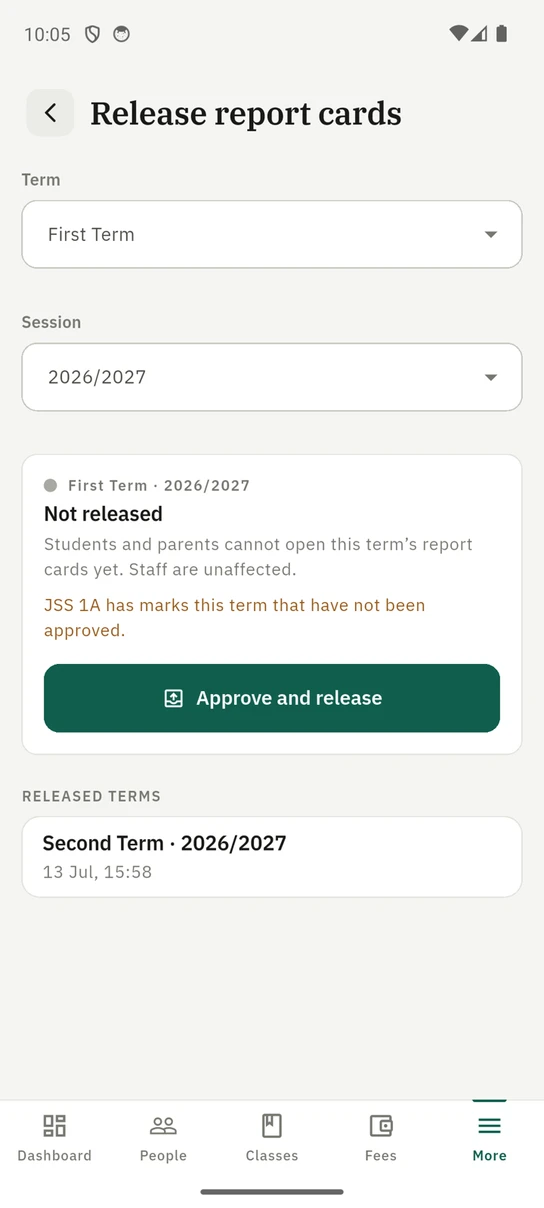
Releasing on the phone: the class still to be approved is named, and approving it is part of the release.
Withdrawing a release keeps every approval, so a school that withdraws a term to put one mark right releases it again without approving every class a second time.
Once a term is released
Every way of changing a mark in that term is refused: entering one, editing one, a bulk entry, a CSV import, deleting, and recomputing letters after a scale change. The rows say Released in place of their actions, and Add Grades explains why its Save button is off.
Withdrawing the release unlocks the term again. That is also the only way to delete a released mark or to regrade its letters: those change what a card says without a correction anybody can read, so they wait until the cards are back in the school's hands.
Correcting a released mark
Somebody with the Amend released results permission sees Amend on a released mark, on the web and on the phone. The form asks for a reason, up to 500 characters, and will not save without one.
A mark that should have been on the card and was not is added the same way: record it as usual, on Add Grades on the web or from Record on the phone, and the form asks for the reason once the term you pick is released.
When the correction is saved:
- The mark changes, and the correction is kept with the mark as it was, the mark as it is now, who made it, when, and why.
- The pupil and their parents are told by email, push and in the app that a result on that term's report card has been corrected. The notice names the subject, never the mark, and opens the card for that term.
- The report card prints Amended on and the date under the subject, on the web, in the PDF and on the phone, so a printed copy and the portal copy that disagree carry the explanation.
- The audit log records it with the reason.
A CSV import cannot write to a released term. Correct those marks one at a time, or withdraw the release, import, and release again.
A mark in an earlier term that was never released is corrected the same way, with a reason, and nobody is told, because no family has seen it.
Who can do what
| Action | Permission | Held by default |
|---|---|---|
| Submit and reopen a subject | Record grades | Anyone who records that subject in the class |
| Approve a class, and approve and release | Approve term results | Owner, School Administrator, Principal |
| Correct a released mark | Amend released results | Owner |
Amend released results is the owner's alone by default, because a correction reaches every family holding the card. You can grant either permission to another role under Roles & permissions.
Schools already using report cards
A term your school had already released is locked from the moment this arrived, including a term that was released automatically when publishing was introduced.
If your current term is among them and your teachers are still entering marks, withdraw its release from the Publish tab, and release it again when the term's results are ready.
On the phone
The whole sign-off works on the mobile app. Open Grades (a bottom-bar tab for most teachers, under More for an administrator) and filter it to a class, a term and a session. The panel above the marks says whether the class is Not approved, Approved or Released, with a Submit or Reopen button beside each subject you record. Somebody who may approve sees Approve with the class's name, and Withdraw approval once it is approved. The same panel appears on the Score sheet, on the multiple-subjects form and on the Broadsheet.
To release a term, open More → Report Cards and tap the Release to families icon at the top. The Release report cards screen names any class still to be approved, and offers Approve and release to somebody who may approve.
To correct a released mark, tap it on the Grades list and choose Amend grade. The form will not save without a Reason for the correction.
Ready to try it with your school?
Three-month Basic trial. No card required to register.