
Finance
Reviewing Recorded Payments
An optional second pair of eyes on money recorded by hand. Off by default, because it only works if your school has two people to do it.
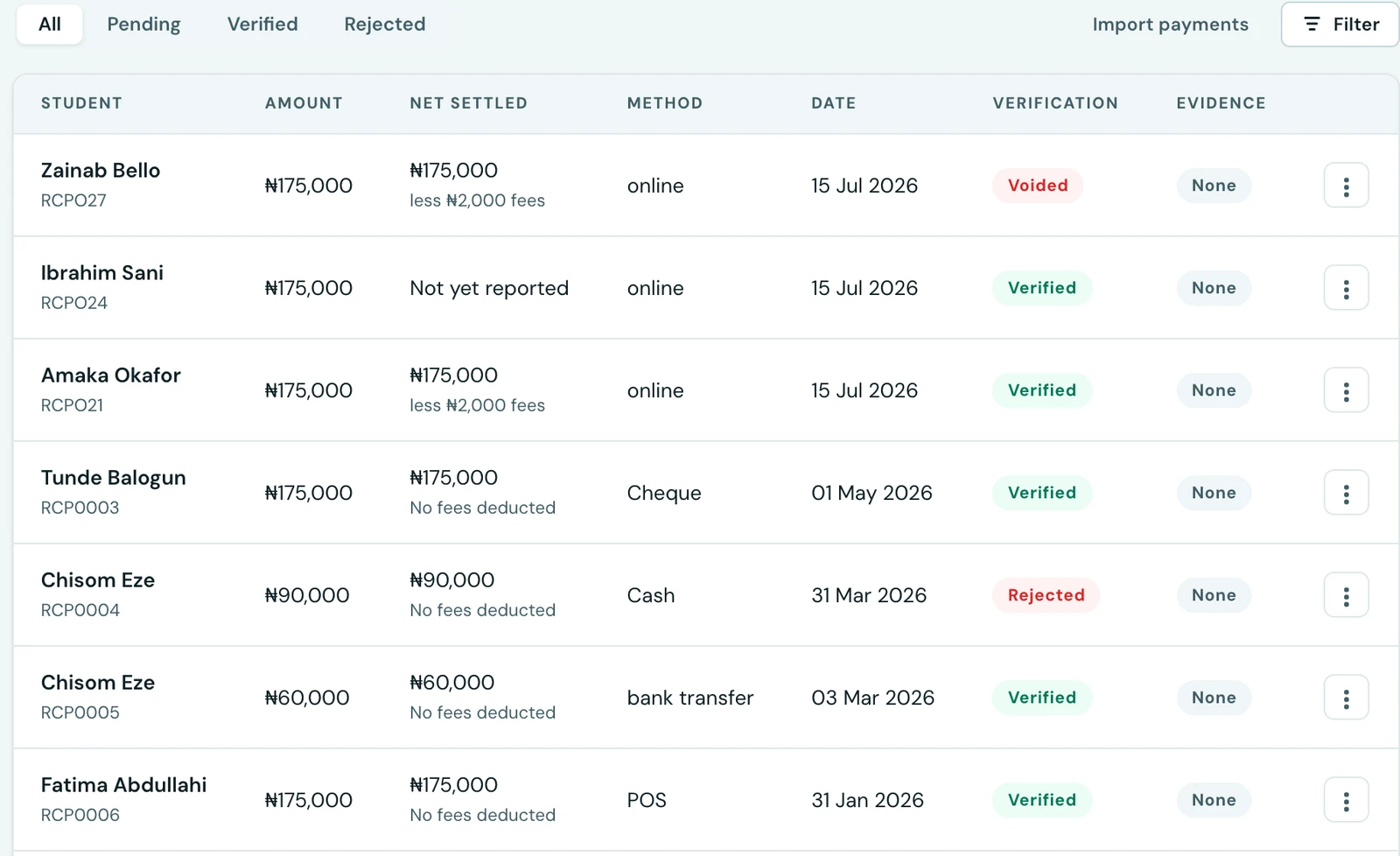
When somebody types "₦150,000 received by bank transfer" into 1410SMS, the platform has no way to know whether that money arrived. Everything that follows takes it on trust: the invoice closes, the family's balance clears, they drop off the debtor list, and the overdue reminder that would have gone out doesn't.
Payment review puts a second person between that claim and the record. It is off by default, and this page explains when to turn it on and, just as importantly, when not to.
When it is off (the default)
A payment counts as confirmed the moment it is recorded. Nothing is queued, nobody has an extra job, and the Payments tab simply shows what has been taken.
This is the right setting for most schools, and the reason is arithmetic rather than trust: review needs two people. If the same person records the payment and then confirms it, the record ends up saying "verified by" somebody who was checking their own work. That is not a weak control. It is a statement that a check happened when it didn't, which is worse than having no statement at all, because it is exactly what you would point an auditor at.
When to turn it on
Turn it on when fees are handled by more than one person, for example a bursar who receives money and a principal or head of administration who confirms it against the bank statement or the cash count.
That is the situation the feature is built for, and there it earns its place: it is the only check in the platform on offline money. The internal consistency checks cannot help here, because a payment that never arrived leaves the books perfectly consistent with themselves and simply wrong about the world.
What happens when it is on
- A payment recorded by hand is saved as Pending.
- It still settles the invoice immediately. The family's balance is correct straight away, and no parent is chased for money they have paid because a queue was not cleared.
- Somebody other than the person who recorded it reviews it, marking it Verified or Rejected, with an optional note. Both are recorded against their name and appear in the audit log.
- You cannot review a payment you recorded yourself. If you try, 1410SMS tells you so, and suggests turning the setting off if one person handles fees at your school.
The receipt waits for the review
A receipt is your school putting in writing that it has the money, so nothing sends one for a payment still sitting in the queue. The family hears from you when the payment is verified, not when it is typed in, and a payment that turns out to be a bounced transfer is never acknowledged in the first place.
Nothing is lost in the wait. Verifying the payment posts the receipt automatically, over whichever channels you have configured, and the person who recorded the payment is told at the time that the receipt is waiting on the review. The Resend receipt action is hidden until then for the same reason.
The invoice does not wait. It settles the moment the payment is recorded, so the family's balance is right straight away and nobody is chased for money they have paid because a queue was not cleared. What waits is only the acknowledgement.
Reviewing never moves money. It records who confirmed the payment. If a payment was entered in error, the correction is to void the receipt, which reverses the amount against the invoice and asks for a reason.
Attach the evidence when you record the payment, at least for transfers. The upload is optional and worth treating as though it is not, because without the bank slip or the transfer screenshot the reviewer is checking a typed figure against another typed figure, which verifies nothing. Evidence files are never served publicly, and reaching one goes through a permission check every time.
Online payments are never queued
Money paid through the payment gateway is confirmed by the provider against the bank before it ever reaches 1410SMS. Asking a member of staff to re-confirm that would be busywork, and busywork is what turns a review queue into something people click through without reading. Those payments arrive verified whatever this setting says.
Turning it on
On the web, Finance → Settings → Payment review, or Settings → Finance. In the mobile app, Settings → Finance, which the Payments screen links to directly when nothing is waiting for review.
It applies from the next payment recorded; anything already confirmed stays as it is.
A note on what this does not do
If the queue is not worked, this setting makes things worse rather than better: pending payments pile up and the school has the appearance of an oversight process without the substance of one. Before switching it on, it is worth being honest about who is going to clear it and how often.
For a small school, the check that actually works is usually not in the software at all. It is the receipt book and counting the cash box against the day's takings.
On the phone
The review queue works on the mobile app. Open Fees, tap the ⋮ menu and choose Payments, then pick Pending from the chips above the list. Open a payment, or use the menu beside it, to Verify or Reject it with an optional note. Verifying posts the receipt to the family, as on the web, and a payment you recorded yourself cannot be verified by you, which the screen says.
The setting is under More → Settings → Finance, named Review Payments Before Confirming, and when the Pending list is empty the Payment review setting button takes you straight there. Evidence such as a bank slip or a transfer screenshot is attached on the web when the payment is recorded: recording a payment on the phone has no attachment.
Ready to try it with your school?
Three-month Basic trial. No card required to register.