
Academics
Homework that is an online test
Set a test your school has already built as this week's homework. The pupil takes it instead of submitting anything, it marks itself, and the outstanding board shows who has not sat it.
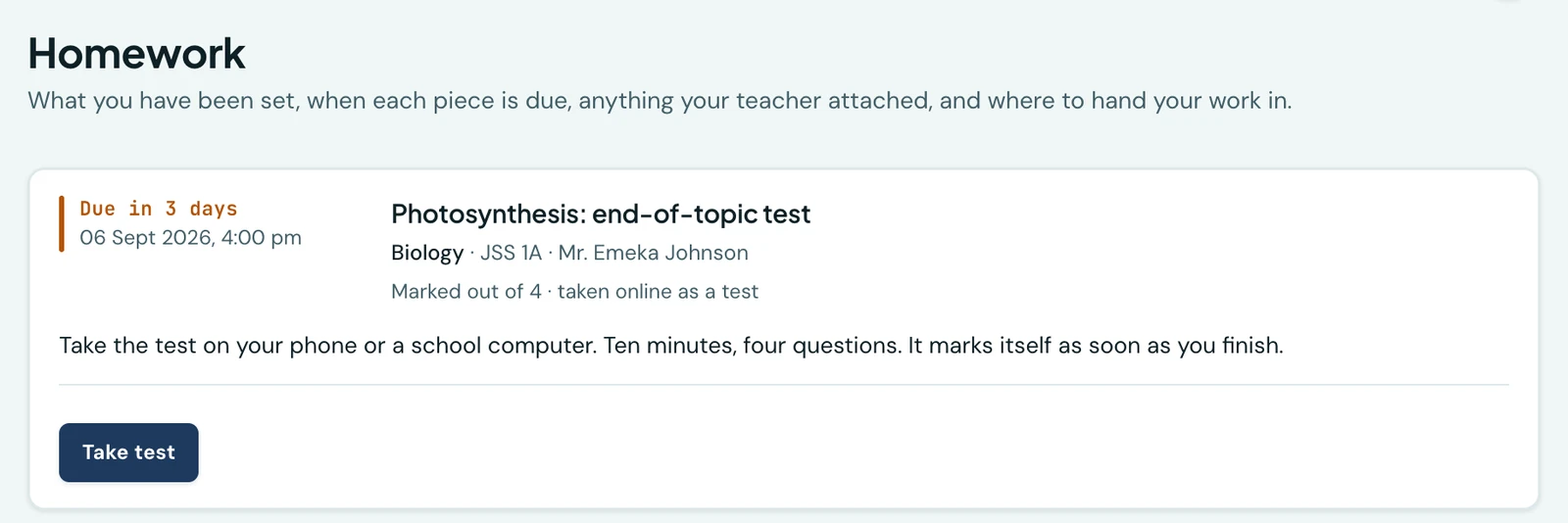
Some homework is not written in a book. A quick end-of-topic check, twenty multiple-choice questions on last week's reading, the revision drill a teacher wants marked before Monday: work that a computer can set and mark, and that a teacher has already built once as an online test.
This joins the two. A piece of homework can be one of your school's tests.
Setting it
On the homework form there is a field called Set a test as this work. Choose one of your school's tests and that is what the class has been set. There is nothing else to fill in: the question of how it is submitted stops being asked, because the answer is that it is taken.
Only tests that are free to be used appear in the list. A test already set as another piece of homework, or already serving as an exam paper, is not offered: it belongs to something else, and two owners would each be moving its window out from under the other. Entrance-exam tests, which are sat by candidates who are not on your roster, are not offered either.
A teacher sees the tests they built. An administrator sees the school's.
What it does to the test
While the link stands, the homework owns the test's clock and its class list.
- It opens when the homework is given out. Work still in draft opens nothing: a class that has not been told about it cannot sit it.
- It closes at the homework's deadline. Move the deadline and the test moves with it. Close the homework and nobody can start the test any more, though a pupil already partway through can finish it. Give the work out again and the test is open until the deadline once more.
- It is set for exactly the classes the homework went to. Add an arm to the homework and the test is set for that arm too.
This is why there is one field rather than two screens. A school that had to keep a test's window and a deadline in step by hand would have them disagree by the end of the first week, and the pupils who lost by it would be the ones who left it until the evening.
What the pupil sees
The work appears on their homework list like everything else, with Take test on the card. They tap it and sit the test there and then; on the phone it opens full-screen, as any timed test does.
Their parents see the same card without the button. A parent reads the record; they do not sit their child's test.
What the teacher sees
The outstanding board answers the same question it always did, in the words that fit: a pupil who has not sat it reads as not taken rather than not submitted. The downloaded list says the same, so nobody goes looking for an exercise book that was never set.
The test marks itself, so there is nothing to tick. The marking sheet shows who has sat it and what they got, and the mark stays where it was earned, on the test, with its own results and its own transcript, rather than copied onto a homework row where it could quietly drift out of step.
Taking it back off
Clear the field and the work goes back to paper. That is refused once anybody has sat the test: unlinking then would put every pupil who took it back on the outstanding board as though they had done nothing. Close the homework instead. It keeps the record, and the results stay where they are.
On the phone
This works the same way on the mobile app. Open More → Homework, tap Set homework (or a piece of work, to edit it) and choose a test in Set a test as this work. Choosing No test: submitted as usual puts it back to paper, under the same rule as the web: not once anybody has sat it.
The Outstanding list says Not taken for a pupil who has not sat it, and the marking sheet a row's Mark button opens counts who has taken it rather than who has submitted. A pupil using the app gets Take test on the card and sits it there and then.
Ready to try it with your school?
Three-month Basic trial. No card required to register.