
Finance
Family Invoices
One invoice for every child in a family, billed to the parent, paid once, with one receipt. What the school raises and what the parent sees in the portal and the app.
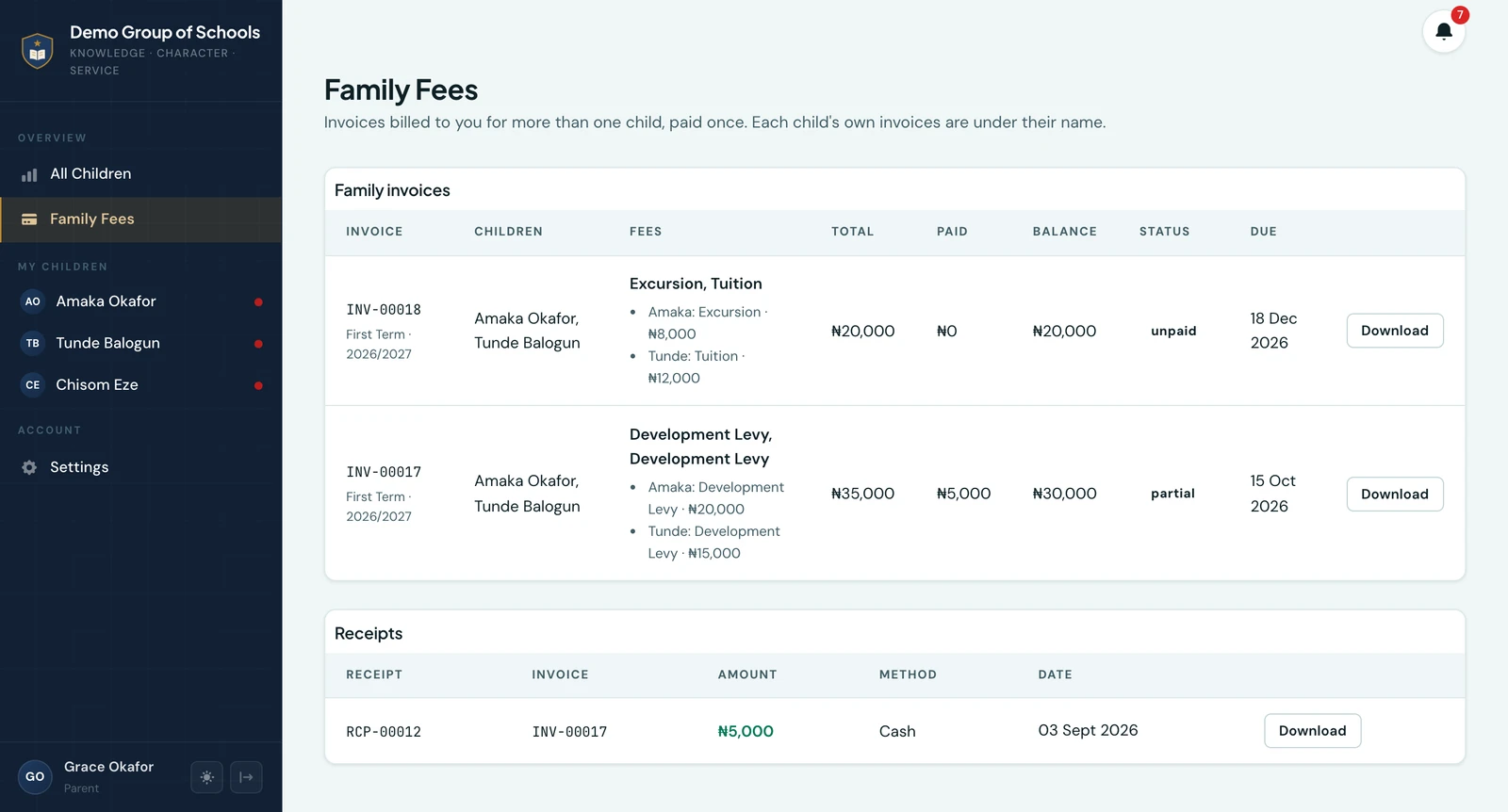
A family invoice is one invoice covering several children of the same parent. It is billed to the parent rather than to any one child, itemised per child, and carries one number, one due date and one balance. The parent pays it once, and gets one receipt.
Why it exists
Before it, a parent with three children at the school got three invoices, and paying online meant three checkouts, three gateway charges and three receipts. The office already thought of the family as one bill, and the parent certainly did; the platform was the only one that did not.
Raising one
On Create Invoice, choose Family (by parent), pick the parent and set each child's own fee lines. One family invoice is the default; One invoice per child is still there for a school that files by pupil. The rest is what every invoice does: it is saved as a draft, edited per child until it is issued, and issuing stamps the number and tells the parent, over the channels set under Settings → Notifications, with an invoice PDF that lists each child's lines under their name and one total at the foot. See Fee Management.
What the parent sees
- Family Fees, a page of its own in the parent portal and a Family chip in front of the children on the app's Fees tab, listing every family invoice and every receipt against one, with Pay now and Download. It is above the child switcher because a family invoice belongs under no one child.
- Under each child too. A family invoice is also listed on each child's Fees tab, marked as the family's, so a parent looking at one child still sees what that child has been billed for. The figure shown is the whole bill: no child's share of it is a figure anyone has decided.
- The pupil sees it, and cannot pay it. A pupil signed in to their own portal sees a family invoice that names them, marked as paid by their parent, with no Pay button.
Paying it
A family invoice is paid exactly as any other: online through online fee collection, including part payment where the school allows it, or recorded at the office. A part payment applies to the whole bill. The receipt is the family invoice's own, addressed to the parent and itemised per child, and it goes out on the same rule as every receipt: once the school has verified the money.
What the office sees
The Finance Workspace lists a family invoice under the parent's name with a Family mark and the children beneath it, and finds it by any name on it. Outstanding balances, collection risk and the reminder queue show a family as one row under the parent, never apportioned across the children, because no child's share of a family bill is a figure the school has ever set. Each child's own fee status still counts a family invoice: an unpaid family invoice makes every child on it unpaid, since the question the badge answers is whether the school is owed anything for that child.
Collection by class is the one report that splits a family invoice, because it answers a question about a class rather than about a bill. What each child was charged is read from the invoice's own lines and their own discounts, so that half is exact; the money paid is shared between their classes in the same proportion, since a payment is the invoice's and no child's share of it has ever been recorded. Every column still totals what the school is owed and has taken, to the kobo. Nothing is written down: the invoice remains the parent's, paid once, and no other screen, receipt or export shows a child's share. A family invoice also counts once in each class it charges for, so the invoice counts on that report add up to more than the number of invoices raised.
On the phone
Family invoices can be raised on the mobile app. Open Fees, tap Invoice and choose Siblings (by parent). Search for the parent, tick each child to bill and set their own fee lines, or use Start from a template. Under Bill as, leave One family invoice selected, or choose One invoice per child. What this invoice will charge prices it, discounts included, before you save.
Save as draft keeps it to finish later; Save & issue stamps the number and tells the parent straight away. A family invoice appears in the invoice list as Family, followed by the children it covers.
Ready to try it with your school?
Three-month Basic trial. No card required to register.