
School Setup
Dates & Calendar
Read and enter every date in the Hijri calendar, in the Gregorian calendar, or in both at once, on your own community's sighting, across the portals, the app and every document you print.
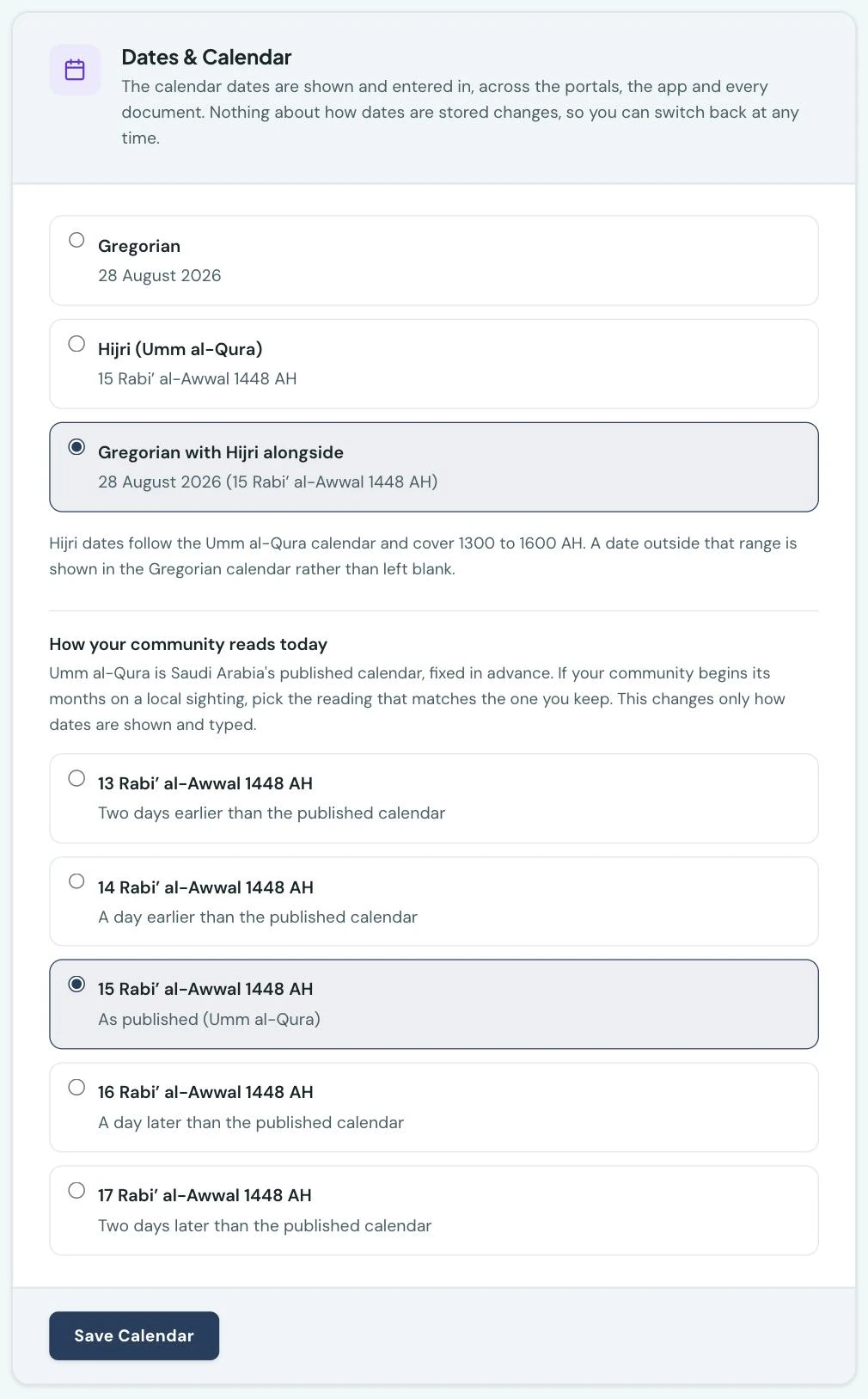
Some schools keep their year by the Hijri calendar, some by the Gregorian, and many work in both: a term timetable in one, a bank's payment date in the other. Settings → Dates & Calendar lets you choose which one 1410SMS shows you, and it applies everywhere at once.
The three choices
Gregorian is what every school starts on. Nothing about your portal changes.
Hijri (Umm al-Qura) shows every date in the Hijri calendar, and lets your staff enter dates in
it too. A due date reads 7 Saf 1448 AH rather than 21 Jul 2026.
Gregorian with Hijri alongside shows both, the Gregorian date first with the Hijri beside it:
21 Jul 2026 (7 Saf 1448 AH). This is the one most schools that want Hijri at all should choose.
It is the only option that lets a bursar quote the same day to a bank and to a family without
converting anything in their head.
Each option shows you today's date rendered the way it would render it, so you can compare all three before you commit to one.
What changes, and what does not
Choosing a calendar changes how dates are shown and typed, and nothing else.
Every date is still stored the same way, so lists sort as they always did, filters return the same records, and your term dates, invoice due dates and exam timetables are untouched. Switching to Hijri and back again changes no record at all. This matters more than it sounds: it means you can try it, look at a few screens, and change your mind, with nothing to undo.
Your academic calendar is also unaffected. Terms, teaching weeks, holidays and closures are all worked out from the dates you entered, and they carry on being worked out the same way whichever calendar you read them in.
Where it applies
Everywhere a date appears, for everyone:
- Every page of the staff portal, and the student and parent portals
- The mobile app, for staff, students and parents
- Every document you print or send: invoices, receipts, report cards, broadsheets, register sheets, exam timetables and the rest
There is one deliberate exception. Your own 1410SMS subscription receipts stay Gregorian, in the same way they use the subscription payment currency (NGN or USD): those are our invoices to you rather than your school's documents.
Anything grouped by month names both
A few screens group records into months rather than showing a date: the cash flow statement under Finance, and the month headings over your holidays and events on the academic calendar. A heading there is not a date, and it is the one place the calendar you chose does not simply replace what you see.
Each of those groups covers a Gregorian month, and no Hijri month covers the same span: a Hijri month begins partway through a Gregorian one and ends partway through the next. Calling the group "Safar" would put a name on a period its contents do not cover, and the figures on a cash flow row would then be added up over one month and labelled with another.
So the group keeps the month it was actually formed on, and names the Hijri months it runs across beside it. A row of the August 2026 statement is headed Aug 2026, with Safar – Rabi' al-Awwal 1448 in smaller type; the calendar's August heading reads August 2026 · Safar – Rabi' al-Awwal 1448. The dates of the records inside each group read in Hijri as they do everywhere else.
The same holds on a trend chart. Each point along the bottom of an income, revenue or admissions chart is one Gregorian month, so the tick names that month with the Hijri months it covers on a second line, shortened to fit: Aug above Saf – Rab I. The Hijri year is printed where the axis crosses into a new one, in the same way the Gregorian year is printed at January and nowhere else, and hovering a point spells both out in full.
Naming your sessions
An academic session is called whatever you call it, and that has not changed. What has changed is the name offered to you when you add one: on Hijri, 1410SMS suggests a Hijri year (1448/1449) rather than a Gregorian one. It is only ever a suggestion, and only when you have no sessions yet. Once you have named a session, every later suggestion continues your own convention, whichever calendar you wrote it in.
Wherever your years are listed, each one is placed by the year it names rather than by the number it happens to be written as. A year written in Arabic numerals is read as the year it is, and a Hijri year sits above the Gregorian years it follows: 1447/1448 is the smaller number and the later year, so a school that changed how it names its years partway through its history still finds the year it is working in at the top of the list, not at the bottom. You do not have to reorder anything, and you do not have to rename your older years to match.
Entering dates
Every date field follows the calendar you chose.
On Hijri, the date picker shows a Hijri month: Rabi' al-Awwal 1448 rather than August 2026, with the Gregorian months it spans named underneath, so you always know where in the year you are.
On Gregorian with Hijri alongside, the picker keeps its Gregorian month, so nothing about how your staff pick a date changes, and prints the Hijri day small under each date. The Hijri months that month runs across are named under the heading.
You never have to convert a date yourself, and you cannot enter one that does not exist.
If your community keeps its own sighting
Hijri dates follow the Umm al-Qura calendar, the civil calendar of Saudi Arabia, which fixes each month's length in advance rather than by sighting the moon. That is what makes a date convertible at all, and it is the calendar almost every system that shows Hijri dates uses.
Plenty of communities begin their months on a local sighting instead, and a sighting can fall a day before or after the published table, occasionally two. If yours does, a date on the screen would read a day off the one your families keep, which is worse than useless on a fee reminder or an exam timetable.
So, under the three options, Settings → Dates & Calendar asks how your community reads today. It offers five readings of this morning's date and you pick the one your own mosque announced. There is no number to work out: the dates are the choice.
Once set, every Hijri date across the platform follows your reading, and so does every date your staff type: pick 1 Ramadan in a date field and 1 Ramadan is what you get back. Nothing about how dates are stored changes here either, so if a month begins differently next year you can change the reading again, with nothing to correct.
The setting appears only when you have chosen Hijri or Hijri alongside Gregorian, and it is "as published" until you say otherwise.
What the calendar covers
Umm al-Qura covers 1300 to 1600 AH, which is 1882 to 2174 in the Gregorian calendar. A date outside that range, such as a mistyped date of birth, is shown in the Gregorian calendar rather than left blank.
Who can change it
An administrator, under Settings → Dates & Calendar. Everyone at the school reads the calendar they choose; there is no per-person setting, because a date quoted in a letter and the same date read on a phone have to be the same date.
On the phone
The mobile app reads and takes dates in whichever calendar the school chose, and an administrator can change the choice from the phone: open More → Settings and tap Brand colours & dates. The calendar sits under the brand colours, with the same three options, each showing today's date as it would render it.
Choose Hijri, or Gregorian with Hijri alongside, and How your community reads today appears below it with the same five readings as the web. Press Save calendar. Every date picker in the app then follows the choice: a Hijri month for a Hijri school, or the Gregorian month with the Hijri day under each date for a school reading both.
Ready to try it with your school?
Three-month Basic trial. No card required to register.