
Finance
Finding Who Qualifies for a Discount
Let the system work out which students qualify for a discount, then award them in one step. It suggests; you decide.
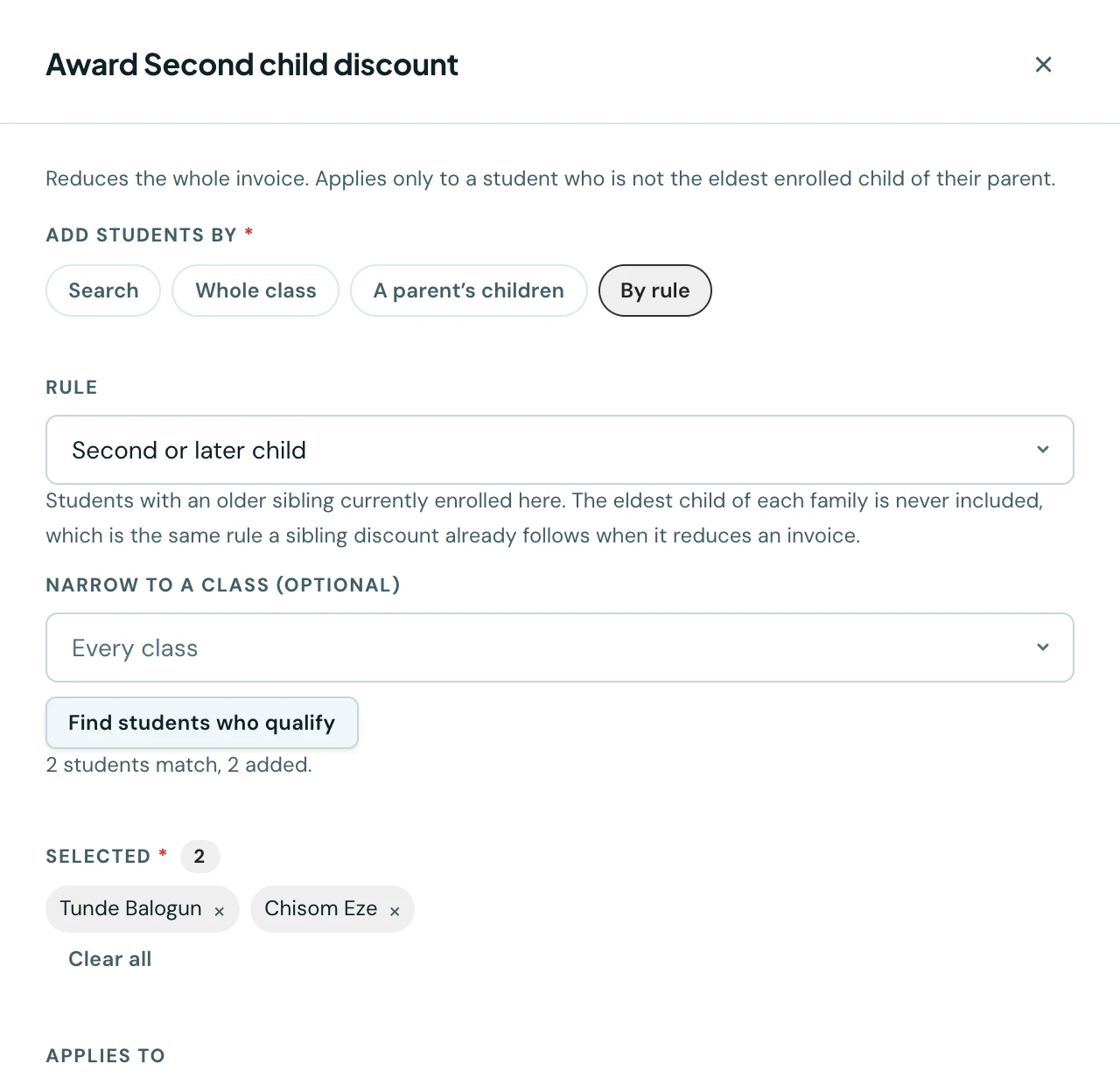
Awarding a sibling discount to every second child in the school means working out who the second children are, which you already know and the platform already knows, and then clicking through them one by one.
Eligibility rules do the working out. You pick a rule, press Find students who qualify, and the matching students fill the award list. You look at it, and you award.
It suggests, it never awards
This is the whole design, and it is deliberate.
A rule that awarded by itself would reduce fees for hundreds of families in one action with nobody's name against it, which is a bigger financial event than anything else in the platform. It would also need an answer to a question with no good answer: when a family stops qualifying (an older sibling leaves, a member of staff resigns), does the system quietly withdraw a reduction the family has already been told about?
Suggesting instead of awarding avoids both. Every award still has a person behind it and an entry in the audit log, and nothing goes stale, because there is nothing stored to go stale: run the rule again whenever you like and it tells you who matches now.
The rules
Second or later child
Students who have an older sibling currently enrolled at your school. The eldest child of each family is never included.
This is the same rule a sibling discount already follows when it reduces an invoice, sharing the same code, which matters more than it sounds. If the two could disagree, you would be able to award a sibling discount to a pupil whose invoice then arrived at full price, with nothing anywhere explaining why.
Ranking is by enrolment order, and only children currently enrolled count, so a family's second child becomes the eldest if their older sibling leaves.
Child of a member of staff
Students with a parent linked to an active staff account at your school.
This one needs setting up first, and the next section explains why.
Telling the platform who is staff
Until now, "staff child" was a label on a waiver and nothing more. The platform had no way to know that a parent was also a teacher, because nothing recorded it: a parent record and a staff account are separate things, joined only by a human knowing they are the same person.
You link them on the Parents page: open a parent's row menu and choose Staff account.
If a staff account at your school has the same email address as the parent, it is offered as a suggestion rather than linked for you. An email address is strong evidence and not proof, it can be shared or reused, and this link decides whether a family pays, so a person confirms it.
A few details worth knowing:
- The link is per school. A parent can teach at one school and have a child at another, so this is only ever a question about one school at a time.
- One staff account, one parent. Two families cannot both claim a staff waiver on the strength of the same job.
- If the staff account is later deactivated, the link is shown with a warning rather than removed. Whether a departing colleague's child keeps their waiver is your decision, not something that should happen automatically on their last day. The rule itself only matches active staff, so they stop appearing in new searches.
Setting a rule on a discount
When you create or edit a discount, Normally awarded to lets you name the rule that usually decides it. It is a memory aid: it preselects that rule when you go to award, so the knowledge lives on the discount rather than in one administrator's head. It awards nothing and applies nothing.
What you see when a rule runs
The summary is deliberately specific: "34 students match, 31 added, 3 already hold this discount."
Students who already hold the discount are counted but not added, because awarding would simply skip them. If more students match than one award can carry, the list says so rather than quietly stopping at the limit.
What is not here
There are only two rules, because a rule can only test facts the platform actually records. Means-testing, siblings at other schools, prior scholarships and academic performance are all reasonable things to want and none of them are things we hold, so offering them would be a promise that could not be kept.
Class-based awards do not need a rule: the award screen already has a Whole class option.
On the phone
Rules work on the mobile app as they do on the web. From Fees, open the ⋮ menu at the top, choose Discounts, and from a discount's menu choose Award to students. Tap Select students. Under the class picker, Or let the platform find them offers an Eligibility rule: pick one and tap Find students who qualify. The matching students are ticked, with the same summary of how many match, were added and already hold the discount, and you can untick anyone before awarding.
When you add or edit a discount, Normally awarded to (optional) sets the rule the award sheet starts on. To record that a parent is a member of staff, open People → Parents, open the parent's menu and choose Staff account.
Ready to try it with your school?
Three-month Basic trial. No card required to register.