
Academics
CBT marks into term grades
Make an online test count as one part of the term mark, such as the 1st CA, and send its scores there. You see exactly what will be written before anything is, a figure a teacher typed is never overwritten, and an administrator can take a send back.
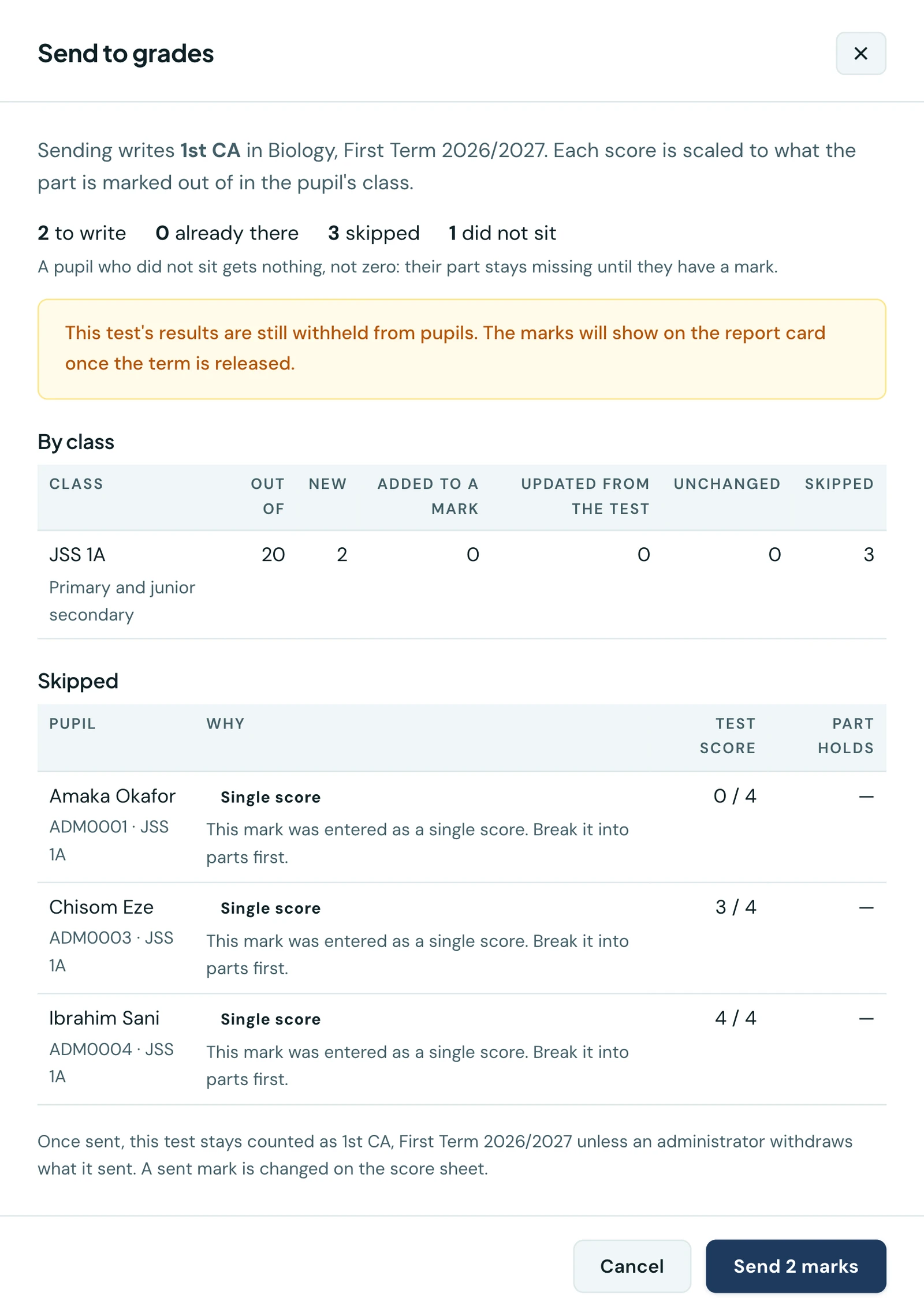
An online test can be one part of the term mark. Tell the platform that this Biology test is your 1st CA, and when the test is over its scores go into the 1st CA of every pupil who sat it. Each score is scaled to what the 1st CA is marked out of in that pupil's class. Nobody types anything in twice.
This builds on assessment structures, which say what a term mark is made of. A test can count towards a part only in a class whose structure has been confirmed.
Choosing what a test counts as
Open the test's results. The Counts towards panel sits at the top. Choose Count towards a term mark, then pick the part. Once it is linked, the panel says how many scores have been sent and how many have not, and Send to grades shows why.
Each part is listed with what it is marked out of in each of the test's classes, because one test can count for different figures in different classes: 17 out of 25 becomes 6.8 where the 1st CA is out of 10, and 13.6 where it is out of 20. A class whose structure does not have that part, or has no confirmed structure yet, is named. The send skips it and says so.
You never choose the term. For a test that is a paper in an exam diet, the marks go to that exam's term. For any other test, they go to the current term. The form names the term before you save, so there is no guessing whether it is the term the test was sat in.
On the phone the same panel is on the test's own screen and on its results, so a test can be linked while it is still a draft. Sending and withdrawing work there as they do on the web.
Sending the marks
Nothing is sent automatically. When you are ready, press Send to grades. The panel first shows what sending would do, and writes nothing until you confirm:
- how many scores will be written, class by class, with what the part is out of in each;
- every pupil it will leave alone, and why: a figure a teacher typed into that part, a mark entered as a single score rather than in parts, a class with no confirmed structure, a class where you do not record the subject, or a pupil who has left the school;
- who did not sit, counted only in classes that take the test's subject. A pupil who missed the test gets nothing, not a zero: their part stays missing until they have a mark;
- warnings worth reading first, such as a class whose results are already approved, or a test whose results pupils have not yet been shown.
Press Send and the report says what was done, class by class: New marks, scores Added to a mark a pupil already had, parts Updated from the test, and those unchanged. Sending again later is always safe. Pupils who sat since are added, a figure the send wrote before is updated if the score changed, and anything a teacher typed stays as it is. To correct one pupil's sent mark, change it on the score sheet like any other.
Seeing which marks came from a test
Wherever staff read or correct a mark, a part a test sent names the test, for as long as it still holds exactly what the test sent. The Term grades list and the grade card on the phone give the test's title with the pupil's score on the test beside the figure it became, such as "19 of 25, scaled to 15.2 of 20", so a scaled figure is not taken for a typing mistake.
When you edit the mark, the note under the part says so too, and says what it means: a resend or a withdrawal can still change that figure, and once you change or accept it, neither will. Change the figure and the note says that saving takes it off the test. The score sheet shows the test's name and the pupil's score on the test in each row it applies to.
Pupils and parents never see which test a mark came from.
Accepting a test's figure as your own
A figure the test sent can be right as it is. To make it yours without retyping it, press Accept as my mark beside the note. The platform asks first, since accepting cannot be undone. After that the part is an ordinary mark: it no longer names the test, a later send leaves it alone ("Accepted by a teacher" in the preview), and withdrawing the test keeps it, naming who accepted it and when.
Anyone who may change the mark may accept it. It is offered only while the part still holds exactly what the test sent, and it is recorded in the audit log. A class whose results are already approved can still accept, and is told what was signed off. Once the term's results are released, accepting is refused and not offered: the figure stays on the report card as it is, and changing the mark is an amendment.
Tests with written answers
A test that mixes objective and written-answer questions is one test and sends one figure. A script whose written answers are still being marked is not sent: the preview counts it as awaiting marking, and the pupil's part stays missing. Send again once the marking is done and its score is written like any other.
Re-marking a written answer changes the score the next send writes, while the test's figure is still the one in the grade. Once the term's results are released, a re-mark is refused, and the change is made as an amendment.
Late submissions scored zero
A pupil who submitted after the time ran out and scored zero is sent as a zero, and the preview names them. If that is not what you want, tick Leave out late submissions scored zero: their part then stays missing, as if they had not sat.
What cannot be changed afterwards
Once any marks have been sent, the test stays counted as that part, in that term, unless an administrator withdraws what it sent. Change is no longer offered. Unlinking the test stops it counting, and the marks already sent stay in the grades as ordinary marks. Linking it again is allowed only to the same part and term.
While a draft test is linked, its subject, its classes and who sits it are fixed, because a change could make it overlap another test that already counts as the same part. Unlink it first to change them. A term or session a test counts towards cannot be deleted until the test is unlinked.
A term whose results have been released refuses a send. A correction after release is made as an amendment, with a reason, as for any other mark.
Withdrawing sent marks
A test sent to the wrong part can be taken back. On the test's results an administrator has Withdraw sent marks, which, like a send, first shows what it would do and changes nothing until you confirm.
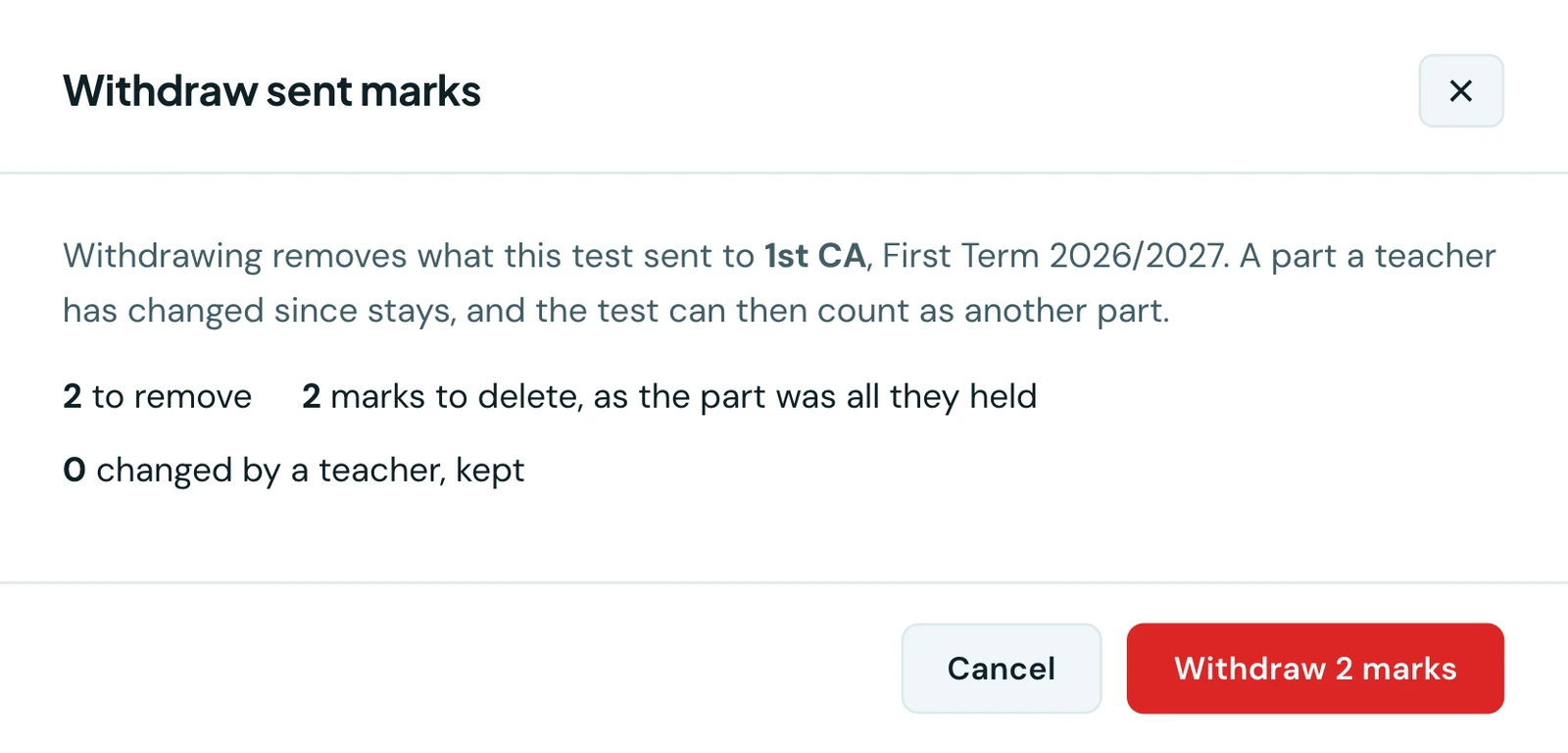
Withdrawing takes out only what the test sent, and says what it will delete before it does.
- Only what the test sent goes. A part a teacher has changed or accepted since belongs to the teacher and stays. The preview names each pupil it keeps, with what their part holds.
- A mark left holding nothing is deleted. One with other parts keeps them, and becomes incomplete until the part is entered again.
- The test is free again. It is still linked, but no longer held to its part and term, so it can be changed to count as another part and sent again.
- Warnings come first, as for a send: a class whose results are already approved, or a subject already submitted.
Withdrawing is refused for a term whose results have been released, or one that is no longer the current term. It is recorded in the audit log against the test.
Who can do it
| Action | Needs |
|---|---|
| Link, change, unlink, send | Manage CBT and Record grades |
| Withdraw sent marks | The same, as an administrator who records grades in every class |
A teacher can link only a test they wrote. Marks go only to classes where they record the test's subject. In any other class the send skips those pupils by name, as Not your subject here, and the subject teacher or an administrator sends them. A teacher cannot withdraw a send. An entrance exam, or a test with no subject, cannot count towards a term mark.
Families see nothing new. A sent score is an ordinary part of the term mark, and appears on the report card when the school releases the term, exactly as a typed one does.
On the phone
Linking a test, sending its marks and taking them back all work on the mobile app, for anyone who holds both Manage CBT and Record grades. Open More → CBT / Tests and tap a test. The Counts towards card sits on the test's own screen, so a draft can be linked before anybody sits it, and again at the top of Results (open it with View results).
Tap Count towards a term mark to choose the part. Once the test is linked, the card shows how many marks have been sent and how many have not, with Send to grades, Change and Unlink beneath. Send to grades shows the same preview as the web before anything is written: class by class, who is skipped and why, and the Leave out late submissions scored zero switch. An administrator also sees Withdraw sent marks, which previews what it would remove in the same way.
On a pupil's grade, a part the test sent names the test, and Accept as my mark under it works as it does on the web.
Ready to try it with your school?
Three-month Basic trial. No card required to register.