
Academics
Class Broadsheet
The class master sheet: every pupil a row, every subject a column, with totals, averages and positions, printed as a landscape PDF or exported as a spreadsheet.
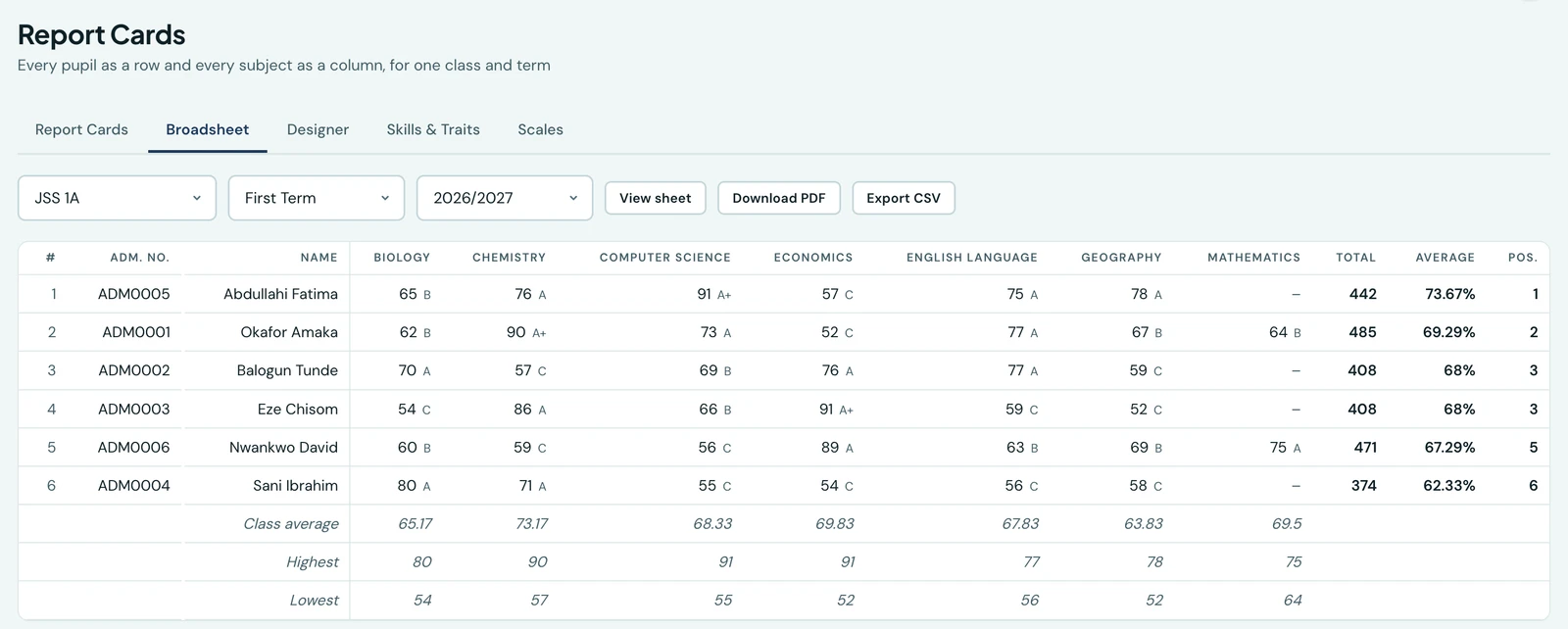
A report card answers one question about one child. A results meeting asks a different one: how did the class do, who is where, and which subject dragged. The broadsheet is that sheet: every pupil on the class list as a row, every subject they were graded in as a column, and the totals, averages and positions along the edge.
Open it at Report Cards → Broadsheet, pick a class, and the term and session default to the one your school is in.
What is on it
Each pupil's row carries their admission number, their name, a cell per subject showing the score and the letter it was given, and then:
- Total: the sum of their scores, over the sum of the marks available to them
- Average: that total as a percentage
- Position: their place in the class
Under the pupils, three summary rows give each subject's class average, highest and lowest, so a subject the whole class struggled with is visible as a column rather than as a pattern somebody has to notice one card at a time.
A subject still waiting for its exam shows an Inc. tag where the letter goes, since an incomplete mark has no letter until the rest is entered. Those marks are left out of that subject's class average, highest and lowest as soon as any pupil's mark in it is complete: a CA out of 40 and a finished paper out of 100 are not the same measurement, and averaging them together would understate the class. While a whole column is still incomplete every mark in it counts, which is what makes a mid-term broadsheet worth reading at all.
The rules it shares with the report card
The broadsheet is not a second opinion. It uses the report card's own ranking and averaging, so a pupil's position on the sheet and the position printed on their card are always the same number.
Three things follow from that, and each is deliberate:
- A pupil with no marks still has a row. They appear with an empty average and no position, sorted to the bottom. A broadsheet that quietly dropped the child nobody entered results for is how that gets discovered in the holidays.
- A blank cell is not a zero. A subject a pupil has no mark in is left empty and is excluded from their average, rather than counted as nothing scored.
- Ties share a position. Two pupils on the same average are both 3rd, and the next pupil is 5th.
The sheet prints the letter stored on each grade, the same letter that pupil's card prints. If you have edited your grading scale since the marks were entered, the Grades page flags those rows and lets you recompute them; the broadsheet never quietly re-grades against today's scale behind the cards' back.
Printing and exporting
View sheet opens the finished PDF in a viewer on the page itself, so you read it without leaving the tab, which is how most schools read it before anybody prints. Download PDF saves the same document, always landscape, because a broadsheet is a grid read across the page. Export CSV gives you the sheet as a spreadsheet for anything the printed version cannot do.
Seeing the assessments behind each mark
A subject mark is usually made of several pieces: a test, a project, an examination. Tick Show assessments and each subject opens into a column per assessment, with the subject's total beside them. Under the pupils, the class average is broken down the same way, which is where a class that worked well all term and then sat a bad examination becomes visible as a pattern rather than as something somebody notices one card at a time.
Only assessments your school actually recorded marks in become columns. If you have five set up and used two this term, you get two.
The assessment headings are printed on their side. That is deliberate: a mark is two digits wide, and a heading printed across the page would make every column as wide as the longest word in it. On its side, the heading takes height instead, your own wording prints in full, and far more of the class fits on one sheet.
There is a limit to how much a sheet of paper holds. Past it the subjects continue on a second sheet rather than the type shrinking to something nobody can read after a photocopy. Each continuation sheet repeats the pupils' names and says which subjects it covers, so no page is a grid of unattributed numbers.
One subject at a time
Pick a subject from All subjects and you get that subject's own sheet: its assessments across the page, and each pupil's total, percentage, grade and position in that subject. That position is worked out on the same rule as the class position, applied to that subject alone, so a pupil who is fourth overall may well be first in Mathematics.
It also carries the earlier terms of the same session, a column each, headed with your own name for that term. That is the question a subject teacher is really asking when they open one class's results: not only where a pupil stands this term, but whether they are climbing or sliding. A pupil with no mark in an earlier term is left blank rather than scored nothing, a term nobody was marked in does not become a column of dashes, and a first term carries none at all. The class average under each of those columns counts the pupils on the sheet, so the column adds up to the figure printed beneath it.
The full-class sheet does not carry the earlier terms, and that is deliberate: it is already as wide as the paper. This is the sheet to open when the question is about one subject over time.
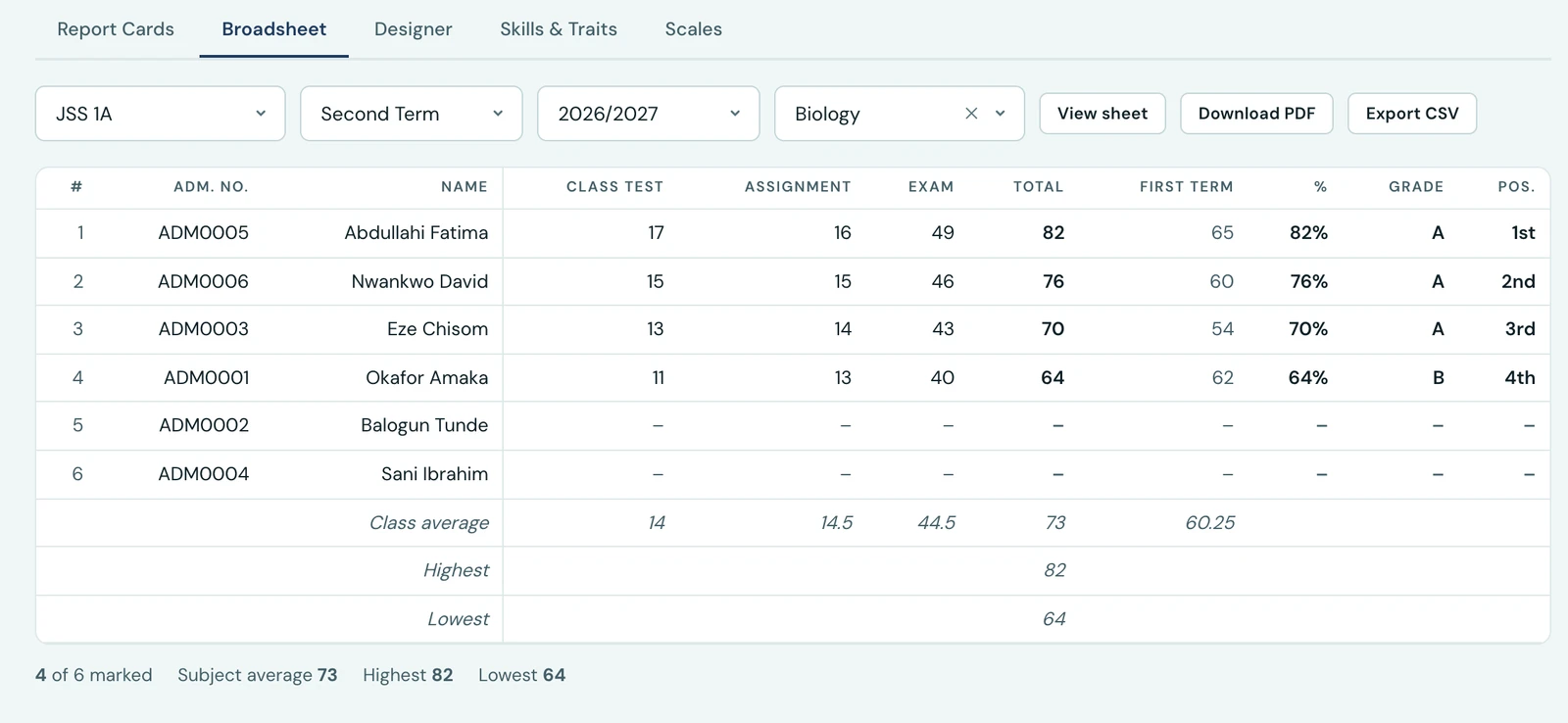
One subject on its own, with the term before it alongside. The First Term column is that pupil's total in the same subject last term, so a class is read across the session rather than a term at a time.
This sheet always fits the width of the page, whatever your class takes: a long register still runs onto a second sheet, with the column headings and the name column repeated on it so the second page is readable on its own. It is the one to reach for when a subject teacher is reviewing their own results, and the one to use if your class takes too many subjects for the full breakdown to fit comfortably.
Positions are printed as 1st, 2nd, 3rd. Where two pupils tie they share a position, and the next pupil takes the one after both.
The CSV always includes the assessment columns, whether or not the screen is showing them, because a spreadsheet has no page to run out of. Positions stay as plain numbers there so you can still sort and total the column.
The printed sheet carries your school's logo at the head and is set in your school's own brand colours, taken from the same place your report cards take theirs: whatever you have set under Settings. A broadsheet leaves the building, into a results meeting and a head of school's file, and it should be recognisably your school's paperwork rather than an anonymous grid. Change your logo or your colours and the next sheet you print carries the change, with nothing to configure here. A school that has not set colours gets the platform's standard navy and gold.
Your primary colour is the text of the sheet, the grid included, and your accent colour is the rule under the school name. Bear a photocopier in mind when you choose them: a fifteen-column table set in a pale brand colour is one nobody at the meeting can read. A dark, legible primary colour is what this document is set in, which is why the platform's own default is a navy.
On the phone
The broadsheet is on the phone as well, under Report Cards, from the grid icon in the top corner. It offers the same four choices the browser does (class, term, session, and one subject or all of them, plus the assessments) and then shows the sheet itself, which you can hand straight to anything on your phone: mail, a message, Save to Files, or a printer.
What you get there is the same document, not a smaller version of it. A broadsheet is thirty rows by fifteen columns, which is a page rather than a screen, so the app shows you the page. It is the sheet to open on the way into a results meeting.
Who can see it
The broadsheet is gated on the same permission as a report card, and scoped the same way: an administrator sees any class, and a teacher sees only the class they are the class teacher of. A sheet is thirty cards side by side, so it cannot be looser than a card. A teacher who runs no class does not reach report cards at all, and so does not reach the broadsheet either; View report cards school-wide, granted on the Roles page, lifts both together.
Ready to try it with your school?
Three-month Basic trial. No card required to register.